Cedar policy rules (AWS Amazon Verified Permissions)
Lab section for Cedar policy syntax used with AWS Verified Permissions and similar services. Add policy examples from the lab here.
RDS audit logs to CloudWatch
Publish MySQL/MariaDB logs from RDS to CloudWatch Logs.
- Open the RDS instance in the console.
- Under Log exports, choose which logs to publish (for example audit, error, general, slow query).
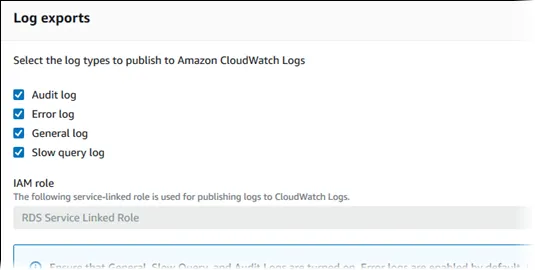
Reference: Publishing MySQL logs to CloudWatch
Export CloudWatch Logs to S3
Create an export task from CloudWatch Logs to S3. The destination bucket needs a policy that allows the CloudWatch Logs service principal.
Reference: Export log data to S3 (console)
Bucket policy template
Replace bucket name, account IDs, Region, and log group ARN.
{
  "Version": "2012-10-17",
  "Statement": [
    {
      "Sid": "AllowCloudWatchLogsGetBucketAcl",
      "Action": "s3:GetBucketAcl",
      "Effect": "Allow",
      "Resource": "arn:aws:s3:::amzn-s3-demo-bucket",
      "Principal": { "Service": "logs.us-east-1.amazonaws.com" },
      "Condition": {
        "StringEquals": {
          "aws:SourceAccount": ["123456789012", "111122223333"]
        },
        "ArnLike": {
          "aws:SourceArn": [
            "arn:aws:logs:us-west-2:712746466936:log-group:/aws/rds/instance/jam-db-instance/audit:*"
          ]
        }
      }
    },
    {
      "Sid": "AllowCloudWatchLogsPutObject",
      "Action": "s3:PutObject",
      "Effect": "Allow",
      "Resource": "arn:aws:s3:::amzn-s3-demo-bucket/*",
      "Principal": { "Service": "logs.us-east-1.amazonaws.com" },
      "Condition": {
        "StringEquals": {
          "s3:x-amz-acl": "bucket-owner-full-control",
          "aws:SourceAccount": ["123456789012", "111122223333"]
        },
        "ArnLike": {
          "aws:SourceArn": [
            "arn:aws:logs:us-west-2:712746466936:log-group:/aws/rds/instance/jam-db-instance/audit:*"
          ]
        }
      }
    }
  ]
}
DynamoDB stream to SQS (EventBridge Pipes)
Point-to-point pipe from DynamoDB streams to SQS without a custom poller Lambda.
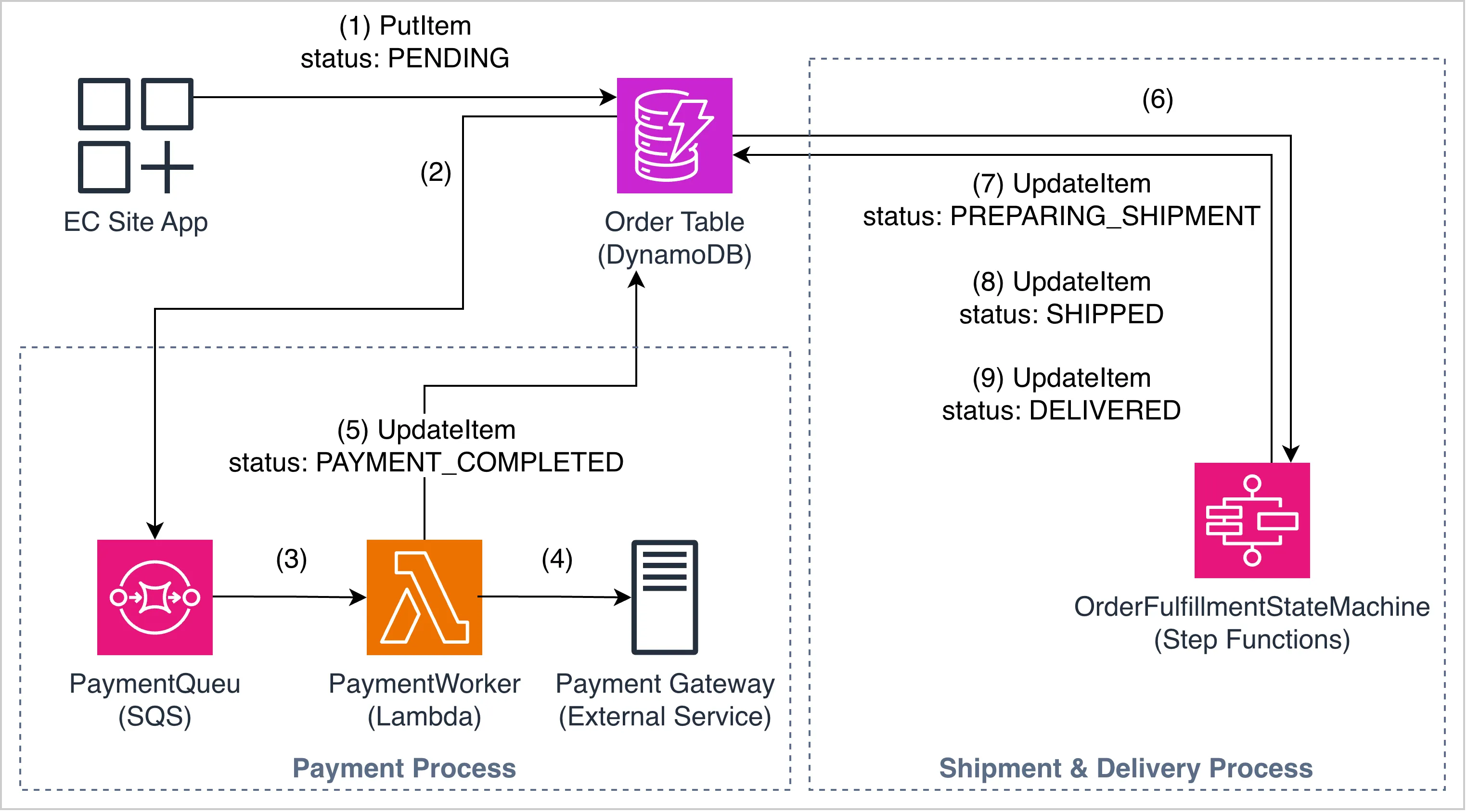
See also: EventBridge notes for pipes, filters, and IAM.
Notifications: EventBridge → FIFO SQS → Lambda
Task checklist
- A FIFO queue exists with content-based deduplication enabled.
- An EventBridge rule targets the FIFO queue with
MessageGroupIdset. - Lambda is triggered by the FIFO queue.
- The old standard queue is not in the active pipeline.
import json
import boto3
import logging

logger = logging.getLogger()
logger.setLevel(logging.INFO)

events_client = boto3.client("events")


def lambda_handler(event, context):
    for record in event.get("Records", []):
        body = json.loads(record["body"])
        detail = body.get("detail", {})
        match_id = detail.get("matchId", "unknown")
        users = detail.get("users", [])

        logger.info(f"MATCH! Processing notification for matchId={match_id}, users={users}")

        # BUG: detail-type is "matchCompleted" but downstream rule
        # rt-log-notification-sent expects "notificationSent"
        events_client.put_events(
            Entries=[{
                "Source": "redthread.notifications",
                "DetailType": "matchCompleted",
                "Detail": json.dumps({
                    "matchId": match_id,
                    "users": users,
                    "status": "sent",
                }),
            }]
        )

    return {"statusCode": 200}
Fix: align DetailType with the downstream rule (notificationSent if that is what the rule matches).
EventBridge rules (put-rule)
References:
Custom event bus: register-device-event-bus
Single-device registration
Requirement:
{
  "registration-type": "single-device",
  "device-count": 1
}- All the requests that are having
registration-typestarting withsingleAND - The requests having
device-countequals to1
Rule:
{
  "detail": {
    "registration-type": [{ "prefix": { "equals-ignore-case": "single" } }],
    "device-count": [1]
  }
}
aws events put-rule \
--name "eb-register-single-device-rule" \
--event-bus-name "register-device-event-bus" \
--event-pattern '{"detail":{"registration-type":[{"prefix":{"equals-ignore-case":"single"}}],"device-count":[1]}}'Bulk device — count 1–99 in any region, or any count in eu-west-1
Requirement:
{
  "registration-type": "bulk-device",
  "device-count": 99,
  "region": "us-east-1"
}
AND
{
  "registration-type": "bulk-device",
  "device-count": 100,
  "region": "eu-west-1"
}- All requests that are having
registration-typevalue starting withbulkAND - The device-count value between
1 and 99forany regionOR the requests having region valueeu-west-1(i.e., in case of eu-west-1 thedevice-countvalue can exceed 100)
Rule:
{
  "detail": {
    "registration-type": [{ "prefix": { "equals-ignore-case": "bulk" } }],
    "$or": [
      { "device-count": [{ "numeric": [">=", 1, "<=", 99] }] },
      { "region": ["eu-west-1"] }
    ]
  }
}
aws events put-rule \
--name "eb-register-bulk-device-rule" \
--event-bus-name "register-device-event-bus" \
--event-pattern '{"detail":{"registration-type":[{"prefix":{"equals-ignore-case":"bulk"}}],"$or":[{"device-count":[{"numeric":[">=",1,"<=",99]}]},{"region":["eu-west-1"]}]}}'Bulk device — count greater than 100 outside eu-west-1
Requirement:
{
  "registration-type": "bulk-device",
  "device-count": 100,
  "region": "us-east-1"
}
AND
{
  "registration-type": "bulk-device",
  "device-count": 100,
  "region": "ap-southeast-1"
}- The requests having registration-type value starting with bulk
- The requests having device-count greater than 100 AND requests having region value other than eu-west-1
Rule:
{
  "detail": {
    "registration-type": [{ "prefix": { "equals-ignore-case": "bulk" } }],
    "device-count": [{ "numeric": [">=", 100] }],
    "region": [{ "anything-but": "eu-west-1" }]
  }
}
aws events put-rule \
--name "eb-register-bulk-device-with-priority-rule" \
--event-bus-name "register-device-event-bus" \
--event-pattern '{"detail":{"registration-type":[{"prefix":{"equals-ignore-case":"bulk"}}],"device-count":[{"numeric":[">=",100]}],"region":[{"anything-but":"eu-west-1"}]}}'Privileged customers → Lambda
Requirement:
{
  "privileged": "true"
}- Route the requests containing the
privilegedproperty to lambda function mentioned above
Rule:
{
  "detail": {
    "privileged": ["true"]
  }
}
aws events put-rule \
--name "eb-reward-privileged-customer-rule" \
--event-bus-name "register-device-event-bus" \
--event-pattern '{"detail":{"privileged":["true"]}}'Image URL validation
Requirement:
{
  "image-url": "https://sampleurl.com/sample.png"
}- The value for image-url should have a value AND
- The value for image-url property should end with
.png/.jpeg/.jpg/.gif
Rule:
{
  "detail": {
    "image-url": [
      { "suffix": ".png" },
      { "suffix": ".jpeg" },
      { "suffix": ".jpg" },
      { "suffix": ".gif" }
    ]
  }
}
aws events put-rule \
--name "eb-save-image-rule" \
--event-bus-name "register-device-event-bus" \
--event-pattern '{"detail":{"image-url":[{"suffix":".png"},{"suffix":".jpeg"},{"suffix":".jpg"},{"suffix":".gif"}]}}'Backup and restore
AWS Backup IAM policies
| Action | AWS managed policy |
|---|---|
| Backup | AWSBackupServiceRolePolicyForBackup |
| Restore | AWSBackupServiceRolePolicyForRestores |
EventBridge target (auto-recover)
aws events put-targets \
  --rule "xyz-auto-recover-rule" \
  --targets "Id"="1","Arn"="arn:aws:lambda:ap-northeast-1:300457517613:function:xyz-auto-recover"
Flows (lab step numbers)
Backup: EC2 enters running → EventBridge Rule 1 → Backup Lambda → backup in vault
1 → 4 → 2 → 6
Restore: EC2 terminated → EventBridge Rule 2 → Recover Lambda → retrieve from vault → new EC2
1 → 5 → 3 → 6 → 1