Overview
A WebSocket API in API Gateway routes each client message to a backend integration using a route key. Three route keys are built in; you add custom keys (for example message, subscribe) for application actions.
| Route key | When it runs |
|---|---|
$connect | During the WebSocket upgrade, before the connection is established |
$disconnect | After the client disconnects |
$default | When the incoming message does not match any other route key |
Custom (e.g. message) | When the client sends a JSON body with "action": "message" (if route selection uses request.body.action) |
References:
CLI inspection commands
Replace API_ID, ROUTE_ID, INTEGRATION_ID, and Region as needed.
# List routes
aws apigatewayv2 get-routes --api-id sjzk7q0onf --region us-east-1

# Check whether a route has a route response
aws apigatewayv2 get-route-responses --api-id sjzk7q0onf --route-id h6z3y2r --region us-east-1

# Inspect integration type and request templates
aws apigatewayv2 get-integration --api-id sjzk7q0onf --integration-id d4macp0 --region us-east-1
What each route can read
| Route | queryStringParameters | Headers | body | requestContext |
|---|---|---|---|---|
$connect | Yes | Yes | No meaningful client message body (HTTP upgrade only) | Yes (connectionId, routeKey, etc.) |
$disconnect | Limited | Limited | No | Yes (disconnectStatusCode, disconnectReason, …) |
| Custom routes | Yes | Yes | Yes | Yes |
$default | Depends on integration | Depends on integration | Depends on integration | Yes |
On $connect, use query string parameters and headers for auth tokens (for example ?token=...). The WebSocket handshake is an HTTP upgrade request, not an application message — do not expect a JSON body from the client at connect time.
On custom route keys (anything other than $connect / $disconnect), the Lambda event includes body and full requestContext.
$default route with MOCK integration
Use MOCK when you want API Gateway to accept the connection or message without calling a backend service (for example a passthrough $default or a no-op $connect).
Integration request
| Setting | Value |
|---|---|
| Integration type | MOCK |
| Request template | {"statusCode": 200} |
The request template must set statusCode. API Gateway uses it to select the matching integration response. Without a valid template/response pair, connections can fail with 500.
Example request template (console often uses application/json as the template key):
{"statusCode": 200}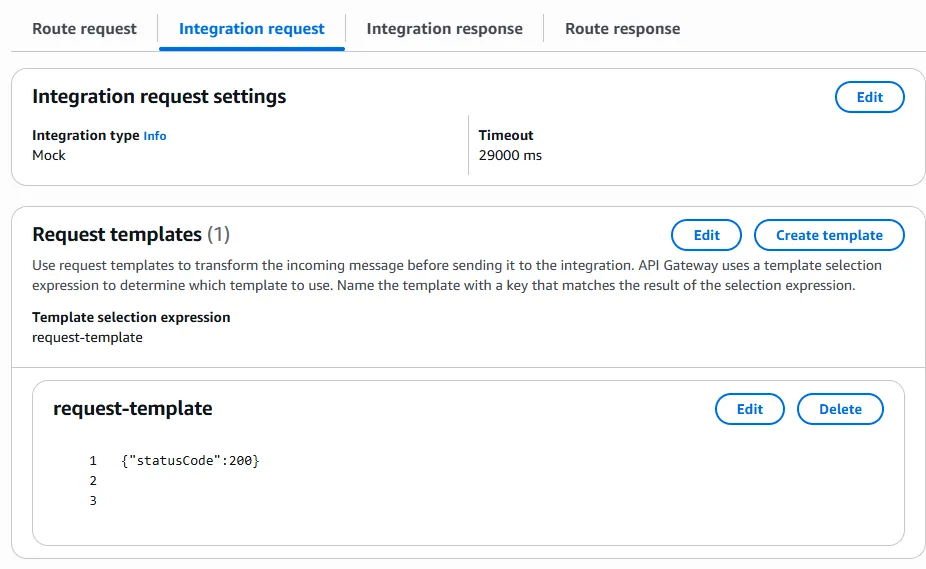
Integration response
| Setting | Value |
|---|---|
| Response key | /200/ (matches statusCode: 200 from the request template) |
| Template selection expression | Optional — only needed when you define response templates |
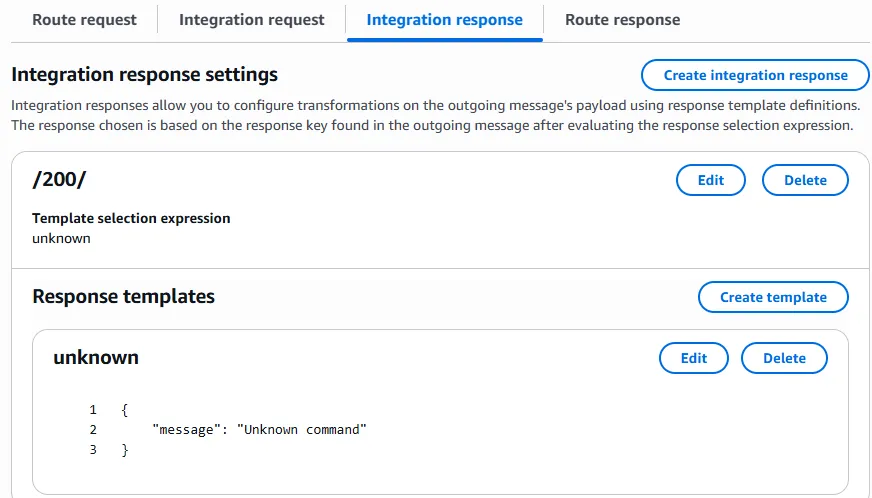
Notes
- Response key
/200/corresponds tostatusCode200 in the integration request template. - For
$connect, the client does not receive a normal HTTP response body, but the integration response is still required for MOCK integrations — otherwise the handshake fails. - To return errors from MOCK, add another request template value (for example
{"statusCode": 400}) and a matching integration response key/400/.
Example CLI integration payload:
{
  "PassthroughBehavior": "WHEN_NO_MATCH",
  "IntegrationType": "MOCK",
  "RequestTemplates": {
    "application/json": "{\"statusCode\":200}"
  }
}
Lambda handler — custom message route
Example for a custom route that reads queryStringParameters, validates a token, and returns connectionId / routeKey.
Use on $connect for auth, or on a custom route if the client sends messages with a body.
import json


def lambda_handler(event, context):
    print("FULL EVENT:")
    print(json.dumps(event))

    connection_id = event["requestContext"]["connectionId"]
    route_key = event["requestContext"]["routeKey"]

    qs = event.get("queryStringParameters") or {}
    print("QUERY STRING:", qs)
    token = qs.get("token")

    print("Connection ID:", connection_id)
    print("Route:", route_key)
    print("Token provided:", bool(token))

    if not token:
        return {
            "statusCode": 401,
            "body": json.dumps({"message": "Missing token"}),
        }

    # Validate token here
    # ...

    return {
        "statusCode": 200,
        "body": json.dumps({
            "connectionId": connection_id,
            "routeKey": route_key,
        }),
    }
$connect behavior: returning statusCode 401 (or 403) from the $connect integration rejects the WebSocket connection. Returning 200 allows it.
Custom routes: parse event["body"] (JSON string) for application payloads. Use @connections API (post_to_connection) to send messages back to the client.
Common issues
| Symptom | Likely cause |
|---|---|
| 500 on WebSocket connect with MOCK | Missing integration request template or integration response key /200/ |
| Route not invoked | routeSelectionExpression does not match client message (check action field in body) |
| Token not found in Lambda | Token sent in connect URL query string — only available on $connect, not later messages unless client resends |
| Cannot message client | Missing execute-api:ManageConnections on the Lambda role for post_to_connection |
Related notes
- API Gateway with Cognito — REST/HTTP auth patterns
- Lambda Python runtime — packaging and handler basics