ShopFlow on ECS: end-to-end production walkthrough
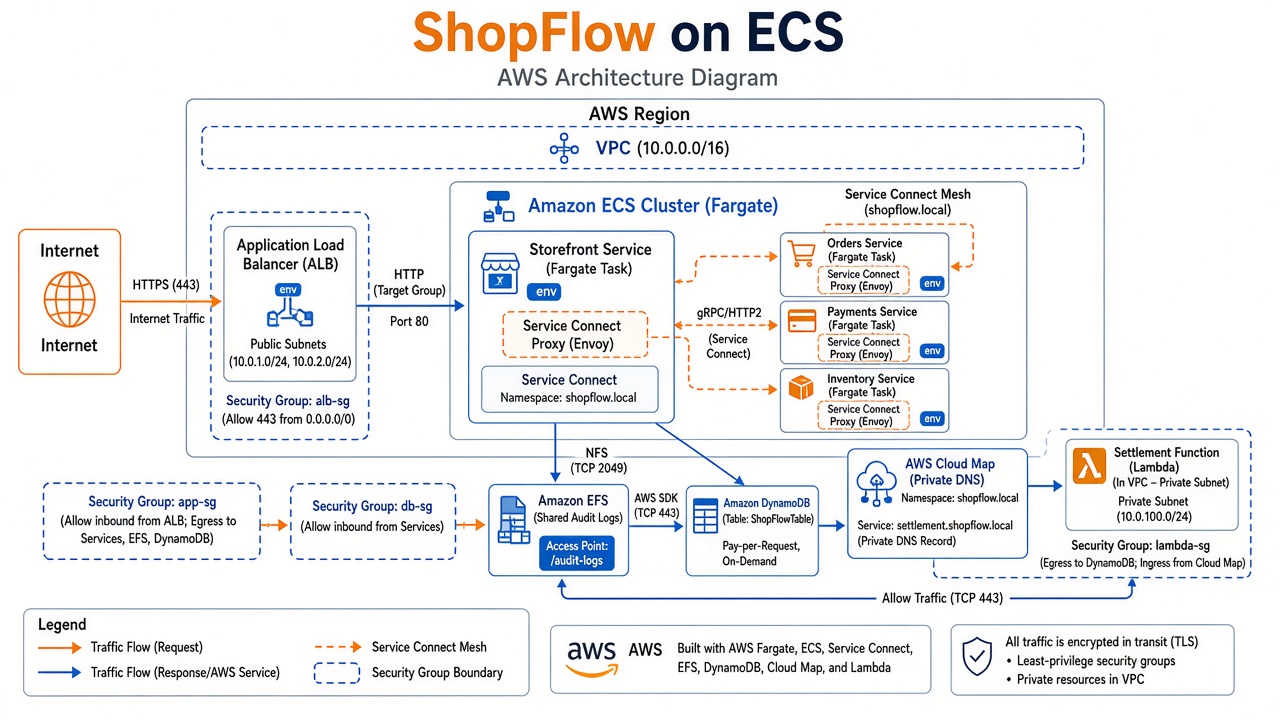
This post implements a realistic workload—not a single “hello task.” ShopFlow is a simplified e-commerce checkout path:
- Storefront (public) accepts
POST /api/checkout. - Orders orchestrates inventory reservation and payment capture.
- Payments and Inventory are internal-only microservices.
- Settlement is a VPC Lambda that health-checks Orders over Cloud Map DNS (not Service Connect).
- EFS stores append-only audit JSONL from Orders (shared, durable, multi-task safe).
You will configure Service Connect for east-west HTTP, Service Discovery for non-ECS callers, EFS for shared files, and an ALB for north-south traffic—following AWS rollout order and production guardrails.
Theory reference: ECS at production scale · Service Connect vs Discovery cheat sheet
Code and JSON artifacts: dir/shopflow-ecs/
1. Requirements and constraints
| Requirement | Design choice |
|---|---|
| HTTPS for customers | Application Load Balancer + ACM certificate |
| Internal APIs not on public internet | awsvpc tasks in private subnets; only Storefront registered to ALB |
| Low-latency service-to-service calls | Service Connect short names (orders, payments, inventory) |
| Batch settlement in VPC | Cloud Map FQDN orders-api.shopflow.prod.internal |
| Audit trail survives task restart | EFS access point mounted only on Orders |
| Observable, safe deploys | Container + ALB health checks, circuit breaker, structured logs |
| Least privilege | Separate task roles per service; EFS IAM enabled on access point |
Region example: us-east-1 · Launch type: Fargate platform LATEST (Linux 1.4+) · Network mode: awsvpc
2. Architecture
                         ┌─────────────────────────────────────────┐
  Internet ──HTTPS──►    │  ALB (public) → storefront:8080         │
                         └──────────────────┬──────────────────────┘
                                            │ Service Connect mesh
                         ┌──────────────────▼──────────────────────┐
                         │  namespace: shopflow-mesh (HTTP)          │
                         │  storefront ──► orders ──► payments     │
                         │              └────► inventory            │
                         └──────────────────┬──────────────────────┘
                                            │
              ┌─────────────────────────────┼─────────────────────────────┐
              │ EFS (audit)               │ Cloud Map DNS_PRIVATE        │
              │ /mnt/efs/audit            │ orders-api.shopflow.prod...  │
              └─────────────────────────────┴──────────────┬──────────────┘
                                                           │
                                                    settlement Lambda (VPC)
Traffic rules
| From | To | Mechanism | Hostname |
|---|---|---|---|
| User | Storefront | ALB target group | shop.example.com |
| Storefront | Orders | Service Connect | http://orders:8081 |
| Orders | Payments, Inventory | Service Connect | payments:8082, inventory:8083 |
| Lambda settlement | Orders | Service Discovery | orders-api.shopflow.prod.internal:8081 |
3. Prerequisites in your AWS account
Complete these once per environment (prod, staging).
3.1 Network
- VPC with private subnets (tasks) and public subnets (ALB only).
- NAT gateway or VPC endpoints for ECR, CloudWatch Logs, EFS.
- VPC DNS hostnames and DNS support enabled (required for Cloud Map).
3.2 ECR image
Build and push the sample app (dir/shopflow-ecs/Dockerfile):
export AWS_REGION=us-east-1
export ACCOUNT_ID=$(aws sts get-caller-identity --query Account --output text)
export REPO=shopflow-api

aws ecr create-repository --repository-name "$REPO" --region "$AWS_REGION" 2>/dev/null || true
docker build -t "$REPO:1.0.0" ./dir/shopflow-ecs
docker tag "$REPO:1.0.0" "$ACCOUNT_ID.dkr.ecr.$AWS_REGION.amazonaws.com/$REPO:1.0.0"
aws ecr get-login-password --region "$AWS_REGION" | docker login --username AWS \
  --password-stdin "$ACCOUNT_ID.dkr.ecr.$AWS_REGION.amazonaws.com"
docker push "$ACCOUNT_ID.dkr.ecr.$AWS_REGION.amazonaws.com/$REPO:1.0.0"
(Adjust path if you cloned only dir/shopflow-ecs.)
3.3 IAM roles (summary)
| Role | Trust | Purpose |
|---|---|---|
shopflow-ecs-execution | ecs-tasks.amazonaws.com | Pull image, write logs, EFS client mount |
shopflow-*-task | ecs-tasks.amazonaws.com | App AWS API calls (minimal for this sample) |
shopflow-settlement-lambda | lambda.amazonaws.com | VPC Lambda logs + ENI |
Attach AWS managed AmazonECSTaskExecutionRolePolicy to execution role; add EFS elasticfilesystem:ClientMount scoped to your access point ARN.
3.4 CloudWatch log groups
Create /ecs/shopflow/storefront, orders, payments, inventory, /ecs/shopflow/service-connect before first deploy (or let execution role create—explicit is cleaner for retention policies).
4. Storage — EFS for audit (production pattern)
Orders appends JSON lines to /mnt/efs/audit/orders-YYYY-MM-DD.jsonl (app.py).
Console — EFS
- Open EFS console → Create file system.
- VPC: same as ECS; mount targets in each AZ used by tasks.
- Encryption: enabled (default KMS or customer managed).
- Performance / throughput: start General Purpose + Bursting; move to provisioned throughput if JSONL write rate spikes.
- Create access point:
- Root path:
/audit - POSIX user/group: match container user (for
python:3.12-slim, often UID0for simplicity in labs; use non-root + matching AP in real prod). - IAM authorization: ON (task role must allow mount).
- Root path:
- Security group on mount targets: allow TCP 2049 from Orders task security group only.
Task definition wiring
See task-def-orders.json: efsVolumeConfiguration with transitEncryption: ENABLED and accessPointId.
Best practice: Only Orders mounts EFS. Storefront, Payments, and Inventory stay ephemeral—smaller blast radius.
5. Service Connect namespace and port naming
Console — HTTP namespace for Service Connect
- ECS console → Namespaces → Create.
- Name:
shopflow-mesh(HTTP namespace for Service Connect). - Copy the namespace ARN (
arn:aws:servicediscovery:...:namespace/ns-...).
Port naming (all four services)
Every task definition must name ports and set appProtocol: http:
| Service | Port | Port name | SC discovery name |
|---|---|---|---|
| Storefront | 8080 | storefront-8080-tcp | (client only) |
| Orders | 8081 | orders-8081-tcp | orders |
| Payments | 8082 | payments-8082-tcp | payments |
| Inventory | 8083 | inventory-8083-tcp | inventory |
Register task definitions in the console (Task definitions → Create) or register JSON revisions. Templates: task-def-storefront.json, task-def-orders.json—duplicate pattern for payments/inventory with APP_ROLE and ports.
Environment variables must match Service Connect aliases (ORDERS_HOST=orders, not orders.shopflow).
6. Service Discovery (for Lambda settlement)
Orders is also registered in a DNS private namespace for non-ECS consumers.
Console — Cloud Map private namespace
- Cloud Map → Create namespace.
- Type: DNS private.
- Name:
shopflow.prod.internal. - VPC: your ECS VPC.
Console — Cloud Map service
- Inside namespace, create service
orders-api. - DNS routing: Multivalue with low TTL if you want faster convergence.
Attach to ECS Orders service
When creating/updating orders ECS service:
- Expand Service discovery (optional).
- Namespace:
shopflow.prod.internal. - Service name:
orders-api.
Resulting FQDN: orders-api.shopflow.prod.internal → task IPs.
Settlement Lambda (lambda_settlement.py) uses ORDERS_DNS=orders-api.shopflow.prod.internal.
7. Deploy services (order matters)
AWS recommends enabling client-server Service Connect on backends before clients (rollout guidance).
Phase A — Internal backends (no ALB)
Deploy in this order; wait for steady state between each:
- inventory — SC client-server, alias
inventory:8083 - payments — SC client-server, alias
payments:8082 - orders — SC client-server, alias
orders:8081+ EFS mount + service discoveryorders-api
Console — create orders service (excerpt)
- Clusters →
shopflow-prod→ Create service. - Compute: Launch type Fargate, task definition
shopflow-orders. - Networking: private subnets, orders-sg.
- Service Connect → Use Service Connect:
- Namespace:
shopflow-meshARN - Add service: port name
orders-8081-tcp, DNS nameorders, port8081 - Optional: Access log configuration → JSON
- Namespace:
- Service discovery:
orders-apiinshopflow.prod.internal. - Deployment circuit breaker: enable rollback.
- Create service.
JSON reference: service-connect-orders.json.
Phase B — Storefront (ALB + SC client)
- Create ALB (internet-facing), HTTPS listener, target group IP mode port 8080, health check path
/ready. - Create storefront service:
- Load balancer: attach to target group.
- Service Connect: enabled, same namespace, no published endpoints (
services: []) — seeservice-connect-storefront-client.json.
- Security groups:
- ALB SG → storefront SG on 8080.
- Storefront SG → orders SG on 8081 (if not using SC proxy-only paths, still allow task-to-task; SC proxy listens on alias ports inside task—follow SC security group guidance).
Phase C — Force client redeploy if needed
If Storefront was deployed before Orders finished registering, run Update service → Force new deployment on Storefront (/etc/hosts caveat).
8. Security groups (reference)
| SG | Inbound | Outbound |
|---|---|---|
alb-sg | 443 from 0.0.0.0/0 | storefront:8080 |
storefront-sg | 8080 from alb-sg | 443 to VPC endpoints / NAT |
orders-sg | 8081 from storefront-sg (+ SC mesh) | payments, inventory, EFS 2049 |
payments-sg | 8082 from orders-sg | — |
inventory-sg | 8083 from orders-sg | — |
efs-sg | 2049 from orders-sg | — |
lambda-settlement-sg | — | orders:8081, logs, NAT |
Use separate SGs per tier—never one shared “ecs-sg” with wide ingress.
9. Verification checklist
9.1 Service Connect (from Storefront task)
ECS Exec into a Storefront task:
cat /etc/hosts | egrep 'orders|payments|inventory'
curl -sS http://orders:8081/health
9.2 Checkout path (public)
curl -sS -X POST "https://shop.example.com/api/checkout" \
  -H "Content-Type: application/json" \
  -d '{"sku":"SKU-100","quantity":2,"orderId":"ord-demo-001"}' | jq .
Expect nested order with inventory.reserved and payment.charged.
9.3 EFS audit
From Orders task (or EC2 bastion with EFS mount):
ls -la /mnt/efs/audit/
tail -n 3 /mnt/efs/audit/orders-$(date -u +%F).jsonl
9.4 Service Discovery (Lambda)
Deploy lambda_settlement.py in VPC private subnets with ORDERS_DNS=orders-api.shopflow.prod.internal. Invoke test event—should return Orders /health body.
9.5 Observability
- ECS → cluster → Metrics / Service Connect namespace metrics.
- CloudWatch Logs →
/ecs/shopflow/*. - Enable Container Insights on cluster for production (ECS CloudWatch).
10. CI/CD and operations
| Practice | ShopFlow application |
|---|---|
| Immutable tags | Push shopflow-api:1.0.1, update task definition revision, rolling deploy |
| Circuit breaker | Enabled on all services |
| Minimum healthy 100% / max 200% | Standard for small task counts; tune for faster rollouts |
| Secrets | Move payment API keys to Secrets Manager; inject via task definition secrets |
| Autoscaling | Target tracking on ALB RequestCountPerTarget for Storefront; CPU for Orders |
| EFS backups | AWS Backup plan on file system; lifecycle to IA for old audit files |
| Multi-AZ | desiredCount >= 2 per service across subnets |
CodePipeline sketch: Source → CodeBuild (docker build/push) → ECS deploy action with imagedefinitions.json per service—four deploy stages or matrix for storefront, orders, payments, inventory (same image, different task defs).
11. What we deliberately did not do (and what to add next)
| Topic | ShopFlow scope | Production next step |
|---|---|---|
| Service Connect TLS | Off in walkthrough | Enable PCA + infrastructure role (TLS guide) |
| Per-task EBS | Not used | Add for ephemeral cache workloads via configuredAtLaunch |
| App Mesh / third-party mesh | Not needed | SC covers L7 east-west for ECS-only |
| DynamoDB / Aurora | Mocked in app | Persist orders in DynamoDB with idempotency keys on orderId |
| WAF | Not shown | Attach AWS WAF to ALB |
12. Artifact index
| File | Description |
|---|---|
dir/shopflow-ecs/app.py | Flask + gunicorn multi-role application |
dir/shopflow-ecs/task-def-orders.json | Orders + EFS + named port |
dir/shopflow-ecs/task-def-storefront.json | Storefront + /ready health |
dir/shopflow-ecs/service-connect-orders.json | SC server config |
dir/shopflow-ecs/service-connect-storefront-client.json | SC client config |
dir/shopflow-ecs/lambda_settlement.py | Cloud Map DNS consumer |