Overview
Amazon VPC Lattice provides application-layer connectivity between services across VPCs and accounts. This lab exposes one Lattice service with two backends - an EC2 Flask app and a Lambda function - then routes by path prefix and weighted default action.
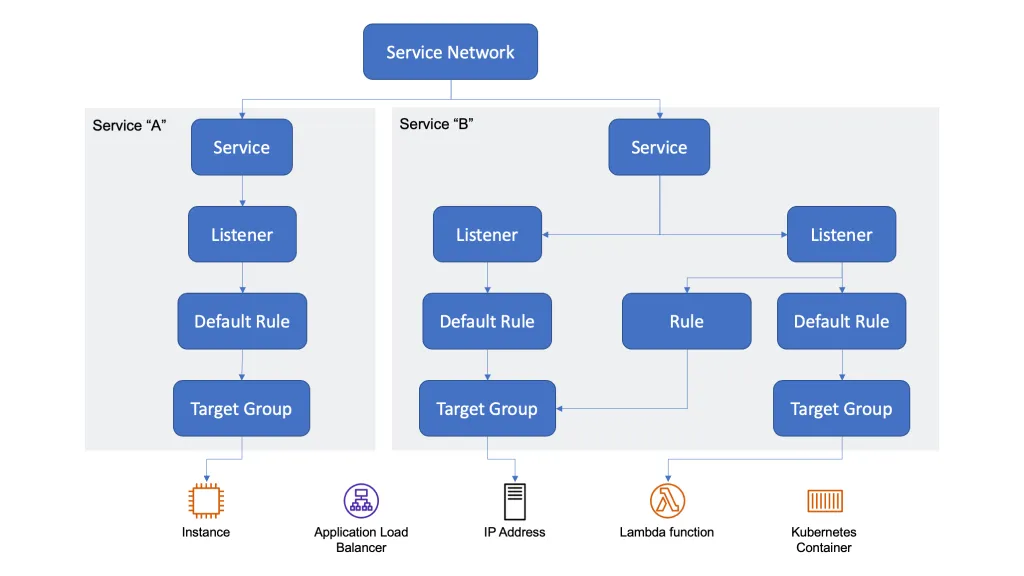
| Component | Role |
|---|---|
| EC2 instance | HTTP backend on port 8080 |
| Lambda function | Serverless backend |
| Target groups | Register EC2 and Lambda targets |
| Lattice service | Listener, routing rules, auth policy |
| Service network | VPC association and client access |
Traffic flow
Client (EC2 in associated VPC)
        │
        ▼
Service network association
        │
        ▼
VPC Lattice service (listener :80 / :443)
        │
        ├─ /to-instance ──► instance target group ──► EC2 :8080
        ├─ /to-lambda   ──► lambda target group   ──► Lambda
        └─ default      ──► 90% instance / 10% lambda
Backends
Backend A: EC2 instance (Flask)
Run a simple Flask app on an EC2 instance in the same VPC you will associate with the service network.
Reference app: dir/lambda/flask/simple/simple.py
from flask import Flask

app = Flask(__name__)

@app.route('/')
def index():
    return 'Hello from the EC2 instance'

@app.route('/<path:path>')
def some_path(path):
    return f'Hello from the EC2 instance at path "{path}"'

if __name__ == '__main__':
    app.run(host='0.0.0.0', port=8080)
requirements.txt
flaskDeploy on the instance
# 1. Install dependencies
pip3 install -r requirements.txt

# 2. Run the application in the background
nohup python3 app.py > app.log 2>&1 &

# 3. Verify locally
curl http://localhost:8080/test
Security group: Allow inbound TCP 8080 from the VPC CIDR (or the AWS managed prefix list for VPC Lattice).
Backend B: Lambda function
Create a standard Python 3.x Lambda that returns a simple HTTP response (for example via Lambda Function URLs or a minimal handler compatible with Lattice Lambda targets).
Target groups
Create two target groups in VPC Lattice:
| Target group | Type | Protocol / port | Target |
|---|---|---|---|
instance-lattice-tg | Instance | HTTP / 8080 | EC2 instance running Flask |
lambda-lattice-tg | Lambda function | - | Configured Lambda function |
Lattice service
Auth policy (IAM)
Attach an auth policy that allows clients to invoke the service. For a lab, start permissive and tighten later.
{
  "Version": "2012-10-17",
  "Statement": [
    {
      "Effect": "Allow",
      "Principal": "*",
      "Action": "vpc-lattice-svcs:Invoke",
      "Resource": "*"
    }
  ]
}
Access logs
Enable access logs on the service (CloudWatch Logs or S3) before testing routing rules.
Listeners and routing rules
Create an HTTP listener on port 80 (or HTTPS on 443) with:
| Priority | Condition | Action |
|---|---|---|
| Rule 1 | Path prefix /to-instance | Forward 100% → instance-lattice-tg |
| Rule 2 | Path prefix /to-lambda | Forward 100% → lambda-lattice-tg |
| Default | (no match) | Forward 90% → instance-lattice-tg, 10% → lambda-lattice-tg |
Weighted default: Target weights must sum to exactly 100%.
Service network
-
Create or select a service network.
-
Associate the Lattice service created above.
-
Associate a VPC - choose the VPC where your client EC2 instance lives.
-
Attach a security group to the service network VPC association:
- Inbound: allow HTTP 80 / HTTPS 443 from the VPC CIDR.
-
Copy the service domain name from the service association details, for example:
svc-0abc123def456789a.abc123.vpc-lattice-svcs.us-east-1.on.aws

Test from a client EC2 instance
Run curl from an instance in the associated VPC:
# Path-based rules
curl "http://${LATTICE_SERVICE_DOMAIN}/to-instance/hello"
curl "http://${LATTICE_SERVICE_DOMAIN}/to-lambda/hello"

# Default weighted routing (repeat to observe distribution)
curl "http://${LATTICE_SERVICE_DOMAIN}/"
Replace ${LATTICE_SERVICE_DOMAIN} with the domain name from the service network association.