Lattice objects
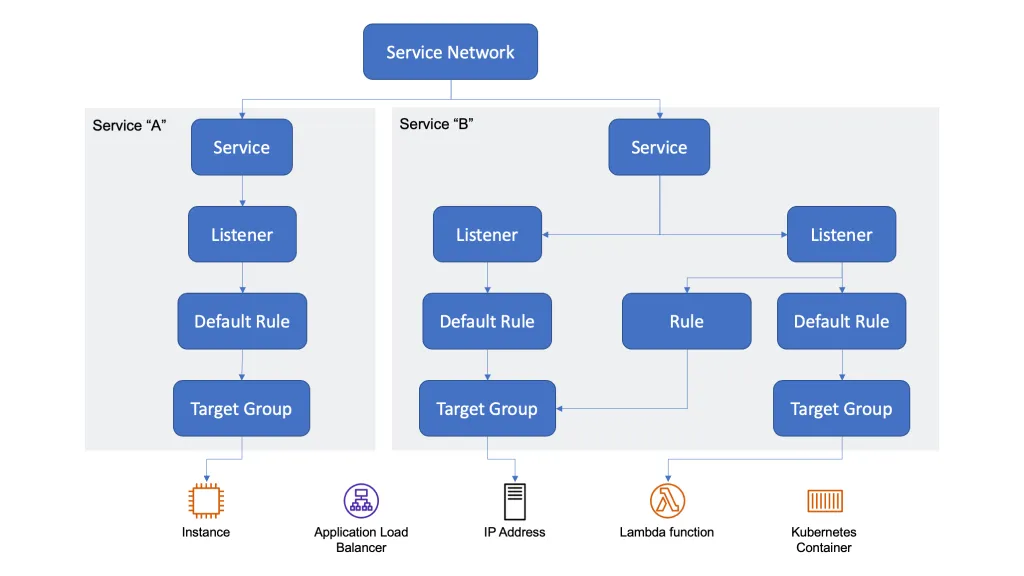
| Object | Role |
|---|---|
| Service network | Boundary for associated services and resource configurations |
| Service | Listeners → rules → target groups |
| Listener | HTTP, HTTPS, or TLS on a port |
| Rule / default rule | Forward to a target group |
| Target group | Instance, IP, Lambda, ALB, Kubernetes |
What this lab deploys
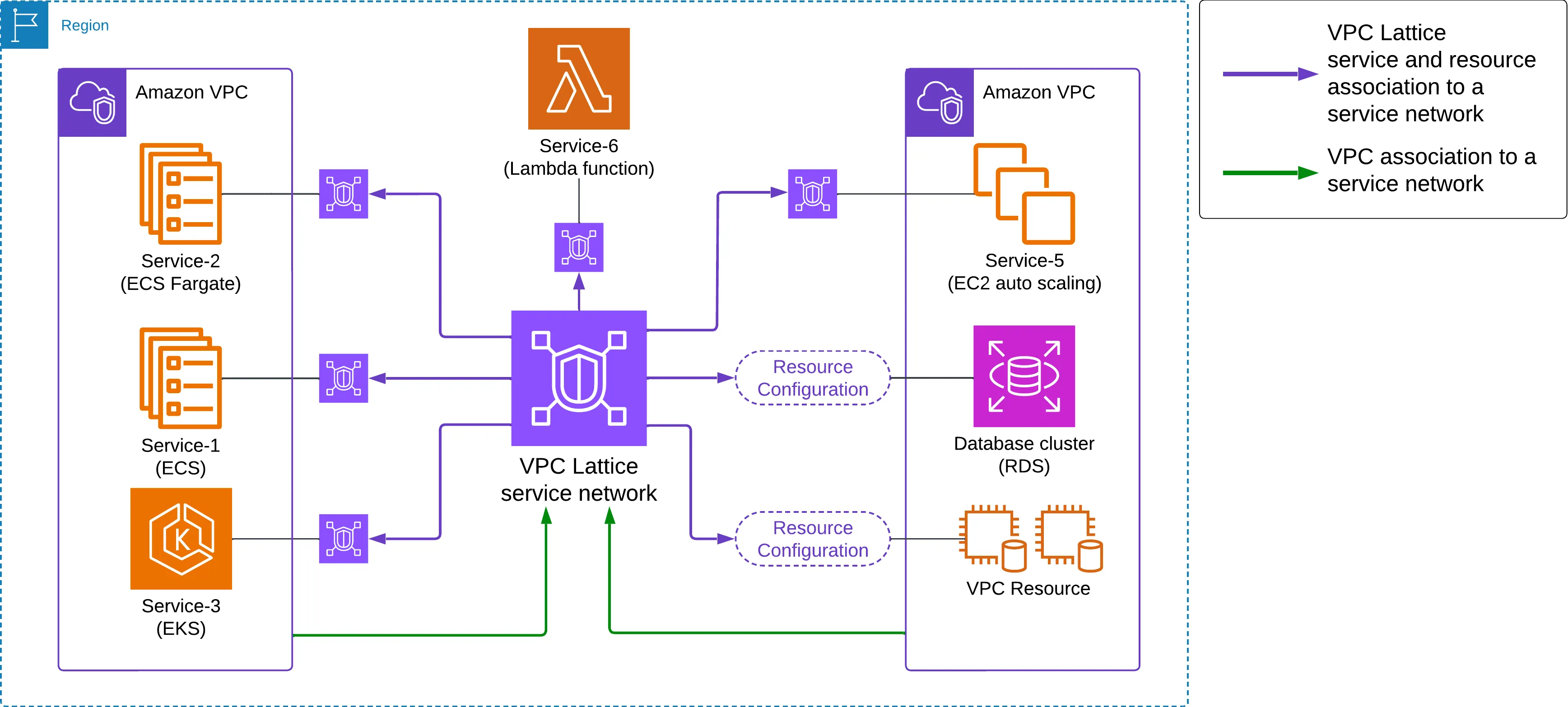
| Diagram | Lab | Lattice object | Source |
|---|---|---|---|
| Left VPC / Service-1 ECS | Order service, VPC-A | Service | ecs-order-service/ |
| Left VPC / Service-2 ECS Fargate | Same app, Fargate launch type | Service | same |
| Left VPC / Service-3 EKS | Inventory, VPC-A | Service | eks-inventory-service/ |
| Service-6 Lambda | Notifications | Service (Lambda TG) | lambda-notification-service/ |
| Right VPC / Service-5 EC2 ASG | Customers, VPC-B | Service | ec2-customer-service/ |
| RDS | PostgreSQL, VPC-B | Resource configuration | rds/init.sql |
| VPC Resource | Private config API, VPC-B | Resource configuration | private-config-resource/ |
Green arrows: VPC → service network. Purple arrows: service or resource-configuration → service network.
Apps listen on 8080. Local compose ports: docker-compose.yml. Lattice HTTP listeners use :80 → target 8080.
1. ECS Order Service (VPC-A)
- Build/push
ecs-order-service/Dockerfileto ECR. - Task definition: container port 8080, named
portMappingsentry (needed for LatticeportName). - ECS cluster + service in VPC-A private subnets (Fargate or EC2). Do not attach an ALB.
- Task security group: allow 8080 from the Lattice prefix list after step 4 (create the SG now; add the prefix-list rule then).
Health: GET /health. Routes: GET /orders, GET /orders/{id}, POST /orders.
2. Service network
VPC → PrivateLink and Lattice → Service networks → Create.
| Field | Value |
|---|---|
| Name | lattice-sn |
| Auth type | None |
CLI:
aws vpc-lattice create-service-network --name lattice-snVPC association (clients in that VPC can call associated services/resources). Attach a security group on the association (inbound HTTP 80 from the VPC CIDR). Associate VPC-A now; associate VPC-B when that VPC exists.
aws vpc-lattice create-service-network-vpc-association \
  --service-network-identifier lattice-sn \
  --vpc-identifier vpc-VPC-A \
  --security-group-ids sg-ASSOCIATION-A
3. Lattice service for orders
- Target group: type IP, protocol HTTP, port 8080, VPC-A.
- ECS service: enable VPC Lattice (
vpcLatticeConfigurations: target group ARN,portNamefrom the task definition, role withAmazonECSInfrastructureRolePolicyForVpcLattice). ECS registers task IPs. Rolling deployments only. - Lattice service (e.g.
order-service) + listener HTTP :80 → that target group. - Service association:
aws vpc-lattice create-service-network-service-association \
  --service-network-identifier lattice-sn \
  --service-identifier svc-ORDER
Copy the service domain (svc-….vpc-lattice-svcs.<region>.on.aws).
4. Security groups
| Attachment | Inbound / outbound |
|---|---|
| Service-network VPC association | Inbound TCP 80 from that VPC’s client CIDR |
| ECS task SG | Inbound TCP 8080 from com.amazonaws.<region>.vpc-lattice |
| Client (if outbound is restricted) | Outbound TCP 80 to the same prefix list |
Do not use the client SG as the source on targets. Packets to targets come from Lattice.
5. EKS Inventory Service (VPC-A)
Same service network. Cluster subnets in VPC-A.
- Build/push
eks-inventory-service/Dockerfile. - Apply
eks-inventory-service/k8s/deployment.yaml(replaceREPLACE_WITH_ECR_IMAGE). ClusterIP 80 → pod 8080.GET /health,GET /inventory/{sku}. - Follow VPC Lattice on EKS with Gateway API: controller install,
defaultServiceNetwork=lattice-sn, VPC association, Gateway, HTTPRoute, TargetGroupPolicy (/healthon port 8080). HTTPRoutebackendRefs→ Kubernetes Serviceinventory-serviceport 80; path prefix/inventorymatches the app.- Pod / node security group: inbound TCP 8080 from
com.amazonaws.<region>.vpc-lattice(plus prefix-list rules on the cluster/node SG per controller deploy guide).
If you skip the controller: IP target group HTTP 8080 in VPC-A, Lattice service HTTP 80, create-service-network-service-association to lattice-sn, and register pod IPs yourself (they change on reschedule).
6. EC2 Customer Service (VPC-B)
- Associate VPC-B with
lattice-sn(association SG: inbound 80 from VPC-B CIDR). - Instance in a private subnet.
user-data.shruns uvicorn 8080. App:ec2-customer-service/app.py-GET /customers/{id}. - Instance target group HTTP 8080. Lattice service
customer-service, listener HTTP 80. Associate withlattice-sn. - Instance SG: inbound 8080 from the Lattice prefix list.
ECS order-service (VPC-A)
        │ HTTP :80
        ▼
   lattice-sn
        │
        ▼
 customer-service → instance TG → EC2 :8080
7. Lambda notification service
Create the function from lambda_function.py. Target group type Lambda. Lattice service, HTTP listener, associate with lattice-sn. No VPC, no prefix-list SG.
8. RDS and private config (resource configurations, VPC-B)
Not Lattice services. Path: associated VPC → lattice-sn → resource configuration → resource gateway in VPC-B → target. Source IP on the target is the gateway ENI.
RDS
- Load
rds/init.sql. - Resource gateway
rds-resourcein VPC-B. SGrds-resource-sg: outbound TCP 5432 to RDS. - RDS SG
rds-pgql: inbound 5432 fromrds-resource-sg. - Resource configuration
orders-db(RDS ARN or IP:5432) on that gateway. Associateorders-dbwithlattice-sn. - Client DNS: service-network resource association (ARN configs can keep the RDS hostname if private DNS is on).
VPC Resource (private-config-resource/app.py on 8080, GET /config)
Same gateway or a second one. Resource configuration type IP, port 8080. Target SG: inbound 8080 from the resource-gateway SG (not the Lattice service prefix list).
9. Call through Lattice
Replace hosts in requests/sample-requests.sh with Lattice service domains (and the resource-association DNS for RDS / config). Run from an instance in VPC-A or VPC-B (both associated).