Pattern
Spokes have no IGW and no NAT. Internet-bound packets go Transit Gateway → inspection VPC (Network Firewall) → egress VPC (NAT + IGW).
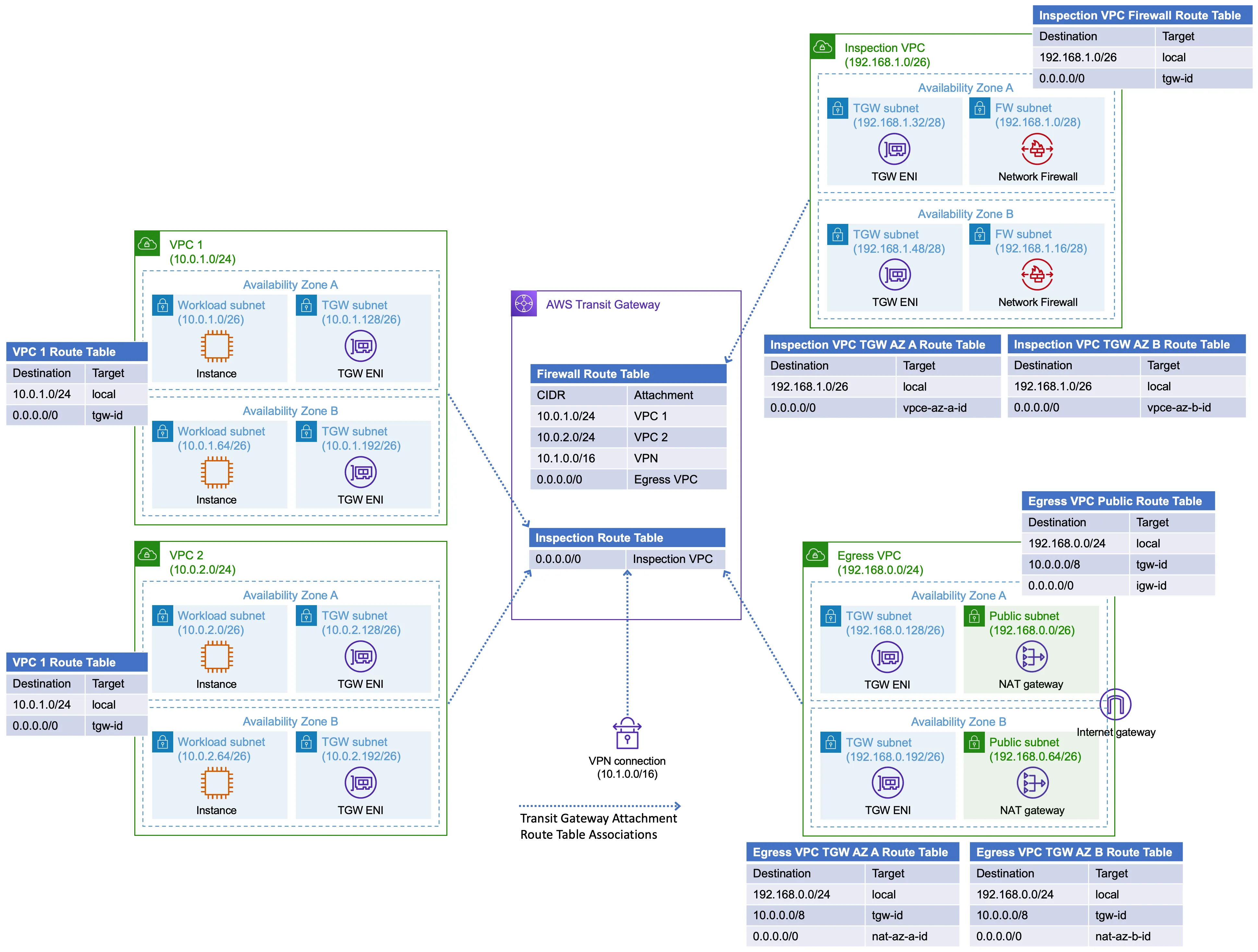
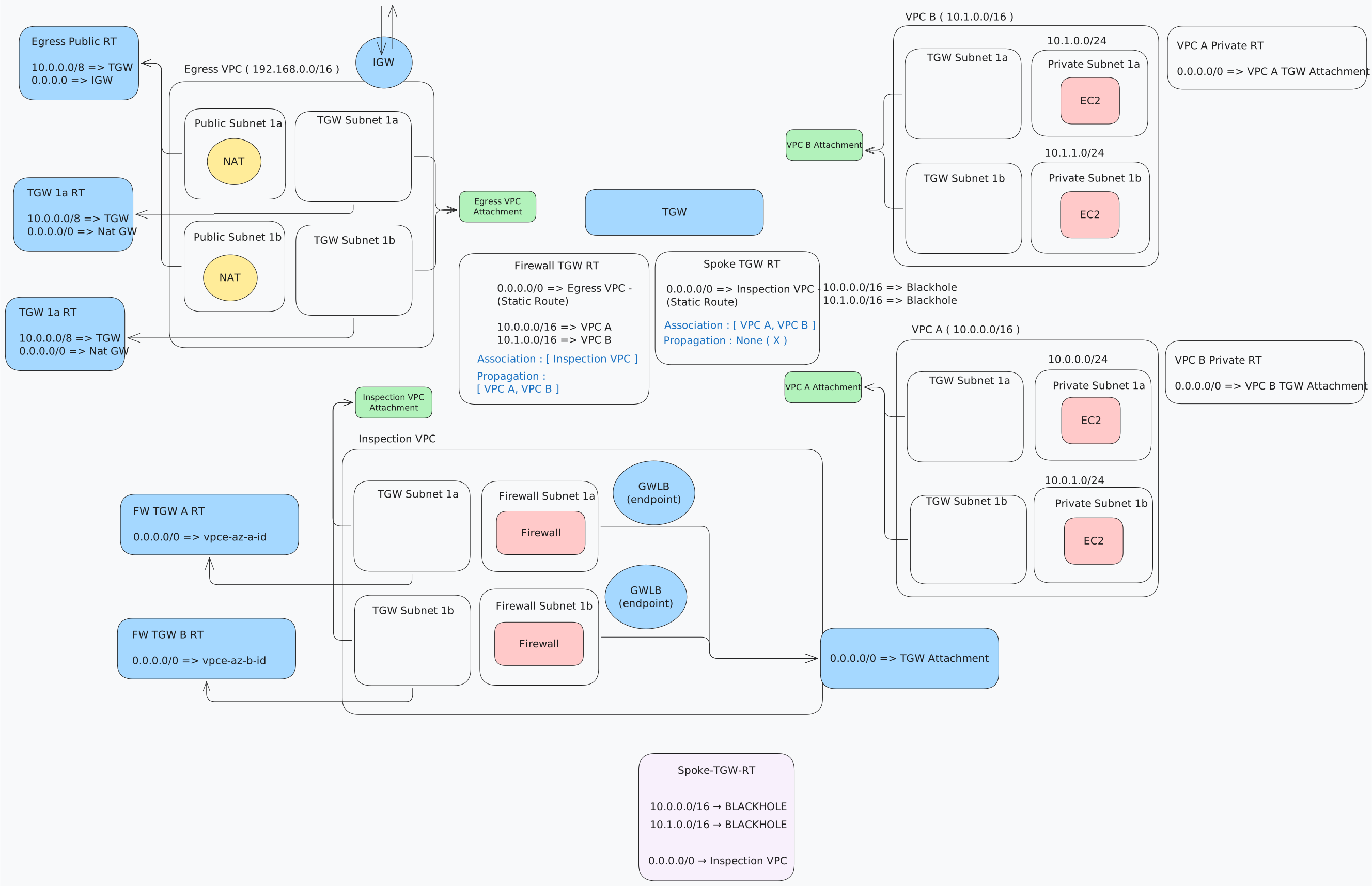
Templates: dir/vpc/egress-firewall/
| VPC | CIDR (defaults) | Role |
|---|---|---|
| spoke-a | 10.0.0.0/16 | Workloads. Private 0.0.0.0/0 → TGW |
| spoke-b | 10.1.0.0/16 | Same, different CIDRs |
| inspection | 10.3.0.0/16 | TGW subnets + firewall subnets (two AZs) |
| egress | 192.168.0.0/16 | TGW subnets + public NAT/IGW |
Network Firewall is created in the firewall subnets. AWS places a Gateway Load Balancer endpoint (vpce-…) in each of those subnets. TGW subnet route tables send 0.0.0.0/0 to the endpoint in the same AZ.
Traffic
Spoke private subnet
        │  0.0.0.0/0 → TGW
        ▼
 TGW spoke route table
        │  0.0.0.0/0 → inspection attachment
        ▼
 Inspection TGW subnet
        │  0.0.0.0/0 → firewall vpce (same AZ)
        ▼
 Network Firewall
        │  0.0.0.0/0 → TGW
        ▼
 TGW inspection route table
        │  0.0.0.0/0 → egress attachment
        ▼
 Egress TGW subnet → NAT → IGW → internet
Return: NAT public RT 10.0.0.0/8 → TGW; egress TGW table uses spoke propagations (spoke CIDRs → spoke attachments). This stack does not hairpin return through inspection.
Spoke CIDRs are blackholed on the spoke TGW table, so spoke-a cannot reach spoke-b via TGW.
TGW tables
Default association and propagation are off (tgw.yaml). Every attachment is associated to one table; extra CIDRs appear only from routes or propagations (routing.yaml).
| Term | Meaning |
|---|---|
| Association | Which table this attachment looks up |
| Propagation | Copy that attachment’s CIDR into a table |
| Static route | Explicit next hop (or blackhole) |
| Table | Associated attachments | How packets leave |
|---|---|---|
| Spoke | spoke-a, spoke-b | 0.0.0.0/0 → inspection. Blackhole each spoke CIDR |
| Inspection | inspection VPC | 0.0.0.0/0 → egress. Spokes propagated (return to workloads) |
| Egress | egress VPC | Spokes propagated (return from NAT) |
Appliance mode
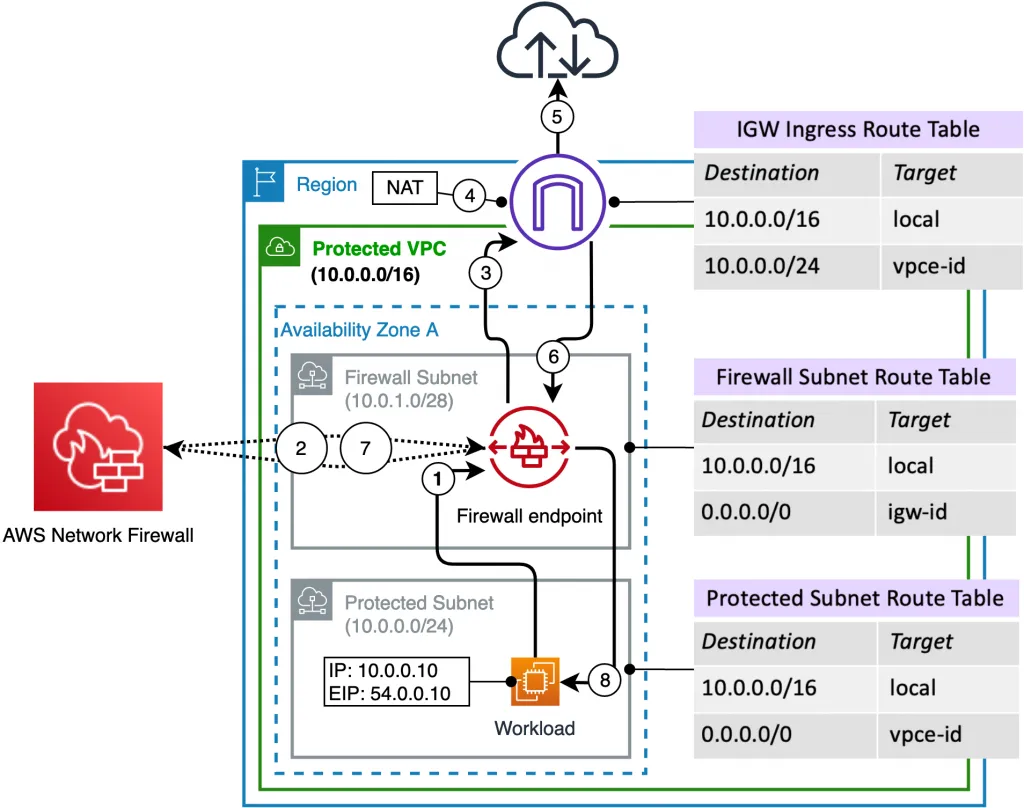
Firewall state is per endpoint. If TGW sends the forward flow to AZ-a and the return to AZ-b, the session breaks. Appliance mode on the inspection VPC attachment pins both directions of a flow to one AZ.
Already set in inspection.yaml (ApplianceModeSupport: enable). Spoke and egress attachments leave it disabled. Equivalent after the fact:
aws ec2 modify-transit-gateway-vpc-attachment \
  --transit-gateway-attachment-id tgw-attach-INSPECTION \
  --options ApplianceModeSupport=enable
Firewall policy
inspection.yaml: stateless default forward to stateful. Stateful group: ALLOWLIST TLS_SNI .amazonaws.com. Anything else that hits the stateful engine is not on that allowlist.
Deploy
Run from dir/vpc/egress-firewall/. TGW first. Inspection, egress, and spokes in parallel. Routing last (needs all attachment exports).
aws cloudformation deploy --stack-name egress-fw-tgw \
  --template-file tgw.yaml

aws cloudformation deploy --stack-name egress-fw-inspection \
  --template-file inspection.yaml --parameter-overrides TgwStackName=egress-fw-tgw

aws cloudformation deploy --stack-name egress-fw-egress \
  --template-file egress.yaml --parameter-overrides TgwStackName=egress-fw-tgw

aws cloudformation deploy --stack-name egress-fw-spoke-a \
  --template-file spoke.yaml \
  --parameter-overrides TgwStackName=egress-fw-tgw VpcName=spoke-a-vpc VpcCidr=10.0.0.0/16

aws cloudformation deploy --stack-name egress-fw-spoke-b \
  --template-file spoke.yaml \
  --parameter-overrides TgwStackName=egress-fw-tgw VpcName=spoke-b-vpc VpcCidr=10.1.0.0/16 \
    PrivateSubnetACidr=10.1.11.0/24 PrivateSubnetBCidr=10.1.12.0/24 \
    TgwSubnetACidr=10.1.21.0/28 TgwSubnetBCidr=10.1.22.0/28

aws cloudformation deploy --stack-name egress-fw-routing \
  --template-file routing.yaml
egress.yaml uses one NAT in AZ-a for both TGW subnets. spoke.yaml is reused per spoke.
Check
- Spoke private RT:
0.0.0.0/0→ TGW - Inspection TGW RT (per AZ):
0.0.0.0/0→ firewallvpcein that AZ - Inspection firewall RT:
0.0.0.0/0→ TGW - Egress TGW RT:
0.0.0.0/0→ NAT; public RT:0.0.0.0/0→ IGW and10.0.0.0/8→ TGW - Inspection attachment: appliance mode enable
- From a spoke instance: TLS to a
*.amazonaws.comname should pass; other destinations should fail the allowlist