Cedar policy rules (AWS Amazon Verified Permissions)
Lab section for Cedar policy syntax used with AWS Verified Permissions and similar services. Add policy examples from the lab here.
RDS audit logs to CloudWatch
Publish MySQL/MariaDB logs from RDS to CloudWatch Logs.
- Open the RDS instance in the console.
- Under Log exports, choose which logs to publish (for example audit, error, general, slow query).
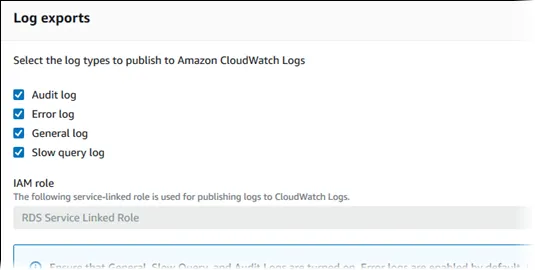
Reference: Publishing MySQL logs to CloudWatch
Export CloudWatch Logs to S3
Create an export task from CloudWatch Logs to S3. The destination bucket needs a policy that allows the CloudWatch Logs service principal.
Reference: Export log data to S3 (console)
Bucket policy template
Replace bucket name, account IDs, Region, and log group ARN.
{
  "Version": "2012-10-17",
  "Statement": [
    {
      "Sid": "AllowCloudWatchLogsGetBucketAcl",
      "Action": "s3:GetBucketAcl",
      "Effect": "Allow",
      "Resource": "arn:aws:s3:::amzn-s3-demo-bucket",
      "Principal": { "Service": "logs.us-east-1.amazonaws.com" },
      "Condition": {
        "StringEquals": {
          "aws:SourceAccount": ["<ACCOUNT_ID>"]
        },
        "ArnLike": {
          "aws:SourceArn": [
            "arn:aws:logs:<REGION>:<ACCOUNT_ID>:log-group:/aws/rds/instance/<DB_INSTANCE>/audit:*"
          ]
        }
      }
    },
    {
      "Sid": "AllowCloudWatchLogsPutObject",
      "Action": "s3:PutObject",
      "Effect": "Allow",
      "Resource": "arn:aws:s3:::amzn-s3-demo-bucket/*",
      "Principal": { "Service": "logs.us-east-1.amazonaws.com" },
      "Condition": {
        "StringEquals": {
          "s3:x-amz-acl": "bucket-owner-full-control",
          "aws:SourceAccount": ["<ACCOUNT_ID>"]
        },
        "ArnLike": {
          "aws:SourceArn": [
            "arn:aws:logs:<REGION>:<ACCOUNT_ID>:log-group:/aws/rds/instance/<DB_INSTANCE>/audit:*"
          ]
        }
      }
    }
  ]
}
DynamoDB stream to SQS (EventBridge Pipes)
Point-to-point pipe from DynamoDB streams to SQS without a custom poller Lambda.
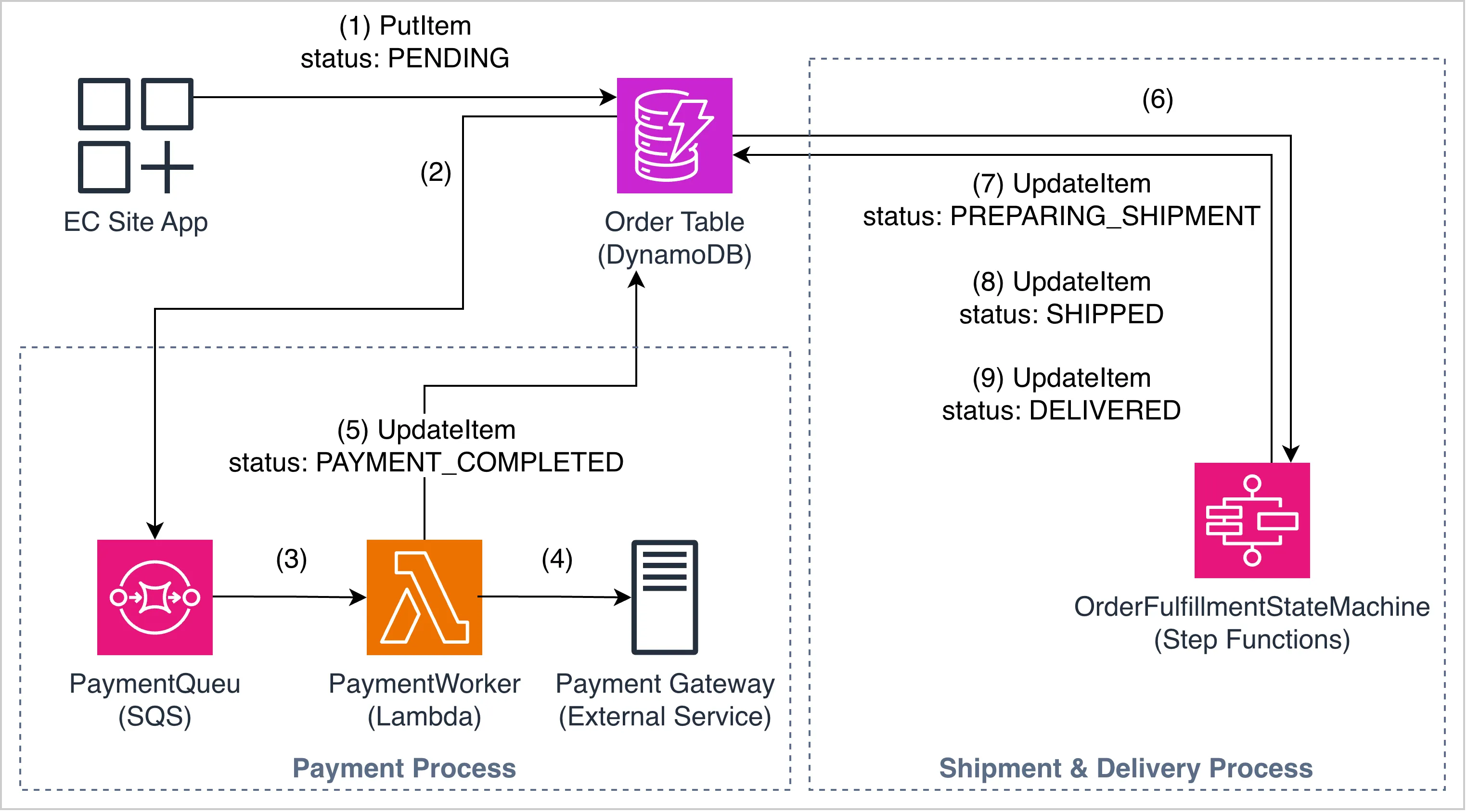
See also: EventBridge notes for pipes, filters, and IAM.
Notifications: EventBridge → FIFO SQS → Lambda
Task checklist
- A FIFO queue exists with content-based deduplication enabled.
- An EventBridge rule targets the FIFO queue with
MessageGroupIdset. - Lambda is triggered by the FIFO queue.
- The old standard queue is not in the active pipeline.
import json
import boto3
import logging

logger = logging.getLogger()
logger.setLevel(logging.INFO)

events_client = boto3.client("events")


def lambda_handler(event, context):
    for record in event.get("Records", []):
        body = json.loads(record["body"])
        detail = body.get("detail", {})
        match_id = detail.get("matchId", "unknown")
        users = detail.get("users", [])

        logger.info(f"MATCH! Processing notification for matchId={match_id}, users={users}")

        # BUG: detail-type is "matchCompleted" but downstream rule
        # rt-log-notification-sent expects "notificationSent"
        events_client.put_events(
            Entries=[{
                "Source": "redthread.notifications",
                "DetailType": "matchCompleted",
                "Detail": json.dumps({
                    "matchId": match_id,
                    "users": users,
                    "status": "sent",
                }),
            }]
        )

    return {"statusCode": 200}
Fix: align DetailType with the downstream rule (notificationSent if that is what the rule matches).
EventBridge rules (put-rule)
References:
Custom event bus: register-device-event-bus
Single-device registration
Requirement:
{
  "registration-type": "single-device",
  "device-count": 1
}- All the requests that are having
registration-typestarting withsingleAND - The requests having
device-countequals to1
Rule:
{
  "detail": {
    "registration-type": [{ "prefix": { "equals-ignore-case": "single" } }],
    "device-count": [1]
  }
}
aws events put-rule \
--name "eb-register-single-device-rule" \
--event-bus-name "register-device-event-bus" \
--event-pattern '{"detail":{"registration-type":[{"prefix":{"equals-ignore-case":"single"}}],"device-count":[1]}}'Bulk device - count 1–99 in any region, or any count in eu-west-1
Requirement:
{
  "registration-type": "bulk-device",
  "device-count": 99,
  "region": "us-east-1"
}
AND
{
  "registration-type": "bulk-device",
  "device-count": 100,
  "region": "eu-west-1"
}- All requests that are having
registration-typevalue starting withbulkAND - The device-count value between
1 and 99forany regionOR the requests having region valueeu-west-1(i.e., in case of eu-west-1 thedevice-countvalue can exceed 100)
Rule:
{
  "detail": {
    "registration-type": [{ "prefix": { "equals-ignore-case": "bulk" } }],
    "$or": [
      { "device-count": [{ "numeric": [">=", 1, "<=", 99] }] },
      { "region": ["eu-west-1"] }
    ]
  }
}
aws events put-rule \
--name "eb-register-bulk-device-rule" \
--event-bus-name "register-device-event-bus" \
--event-pattern '{"detail":{"registration-type":[{"prefix":{"equals-ignore-case":"bulk"}}],"$or":[{"device-count":[{"numeric":[">=",1,"<=",99]}]},{"region":["eu-west-1"]}]}}'Bulk device - count greater than 100 outside eu-west-1
Requirement:
{
  "registration-type": "bulk-device",
  "device-count": 100,
  "region": "us-east-1"
}
AND
{
  "registration-type": "bulk-device",
  "device-count": 100,
  "region": "ap-southeast-1"
}- The requests having registration-type value starting with bulk
- The requests having device-count greater than 100 AND requests having region value other than eu-west-1
Rule:
{
  "detail": {
    "registration-type": [{ "prefix": { "equals-ignore-case": "bulk" } }],
    "device-count": [{ "numeric": [">=", 100] }],
    "region": [{ "anything-but": "eu-west-1" }]
  }
}
aws events put-rule \
--name "eb-register-bulk-device-with-priority-rule" \
--event-bus-name "register-device-event-bus" \
--event-pattern '{"detail":{"registration-type":[{"prefix":{"equals-ignore-case":"bulk"}}],"device-count":[{"numeric":[">=",100]}],"region":[{"anything-but":"eu-west-1"}]}}'Privileged customers → Lambda
Requirement:
{
  "privileged": "true"
}- Route the requests containing the
privilegedproperty to lambda function mentioned above
Rule:
{
  "detail": {
    "privileged": ["true"]
  }
}
aws events put-rule \
--name "eb-reward-privileged-customer-rule" \
--event-bus-name "register-device-event-bus" \
--event-pattern '{"detail":{"privileged":["true"]}}'Image URL validation
Requirement:
{
  "image-url": "https://sampleurl.com/sample.png"
}- The value for image-url should have a value AND
- The value for image-url property should end with
.png/.jpeg/.jpg/.gif
Rule:
{
  "detail": {
    "image-url": [
      { "suffix": ".png" },
      { "suffix": ".jpeg" },
      { "suffix": ".jpg" },
      { "suffix": ".gif" }
    ]
  }
}
aws events put-rule \
--name "eb-save-image-rule" \
--event-bus-name "register-device-event-bus" \
--event-pattern '{"detail":{"image-url":[{"suffix":".png"},{"suffix":".jpeg"},{"suffix":".jpg"},{"suffix":".gif"}]}}'Backup and restore
AWS Backup IAM policies
| Action | AWS managed policy |
|---|---|
| Backup | AWSBackupServiceRolePolicyForBackup |
| Restore | AWSBackupServiceRolePolicyForRestores |
EventBridge target (auto-recover)
aws events put-targets \
  --rule "xyz-auto-recover-rule" \
  --targets "Id"="1","Arn"="arn:aws:lambda:<REGION>:<ACCOUNT_ID>:function:xyz-auto-recover"
Flows (lab step numbers)
Backup: EC2 enters running → EventBridge Rule 1 → Backup Lambda → backup in vault
1 → 4 → 2 → 6
Restore: EC2 terminated → EventBridge Rule 2 → Recover Lambda → retrieve from vault → new EC2
1 → 5 → 3 → 6 → 1
Windows / RDP and IMDS
Symptom: Windows instance cannot reach IMDS at 169.254.169.254.
Gateway IP is the subnet default route for 0.0.0.0 in route print. Prefer IMDSv2.
route print
route DELETE 169.254.169.254
route -p ADD 169.254.169.254 MASK 255.255.255.255 <SUBNET_GATEWAY_IP>

iwr -Uri 'http://169.254.169.254/latest/meta-data/'

netsh winhttp reset proxy
W32tm /resync /force
Restart-Service AmazonSSMAgent
Always restart the SSM agent after network/proxy changes: Restart-Service AmazonSSMAgent.
Systems Manager (SSM)
RDP down, SSM up (or SSM instead of RDP): agent on the AMI, instance role AmazonSSMManagedInstanceCore, outbound TCP 443 via NAT or Interface endpoints.
SSM agent offline: missing role, no path to SSM APIs, no VPC endpoints on a private subnet, SG/NACL blocking 443.
| Need | What |
|---|---|
| Role | AmazonSSMManagedInstanceCore on the instance |
| Endpoints | ssm, ec2messages, ssmmessages in com.amazonaws.<region>.* |
| Endpoint SG | Inbound 443 from instance SG / VPC CIDR |
| Placement | Endpoints in the instance’s subnets (or routed to them) |
Template: dir/ssm-vpc-endpoint.yaml
CloudWatch Agent
Instance role: CloudWatchAgentServerPolicy. IAM · Install
Linux (AL2 / yum):
sudo yum install amazon-cloudwatch-agent
cd /opt/aws/amazon-cloudwatch-agent/bin
sudo ./amazon-cloudwatch-agent-ctl -a start -m ec2 -c default -s
Windows: install from the same install doc; start the Amazon CloudWatch Agent service.
ACM Private CA
CA chain (trust store):
aws acm-pca get-certificate-authority-certificate \
  --certificate-authority-arn arn:aws:acm-pca:<region>:<account-id>:certificate-authority/<ca-id> \
  --output text > ca_certificate.pem
Issued cert:
aws acm-pca get-certificate \
  --certificate-authority-arn "<CA_ARN>" \
  --certificate-arn "<CERT_ARN>" \
  --query 'Certificate' --output text > cert.pem
Chain for that cert: --query 'CertificateChain' → cert_chain.pem.
get-certificate-authority-certificate · get-certificate
AWS Config (Guard)
SG open to the world (0.0.0.0/0 / ::/0). Managed check for CodeBuild plaintext AWS creds in env: codebuild-project-envvar-awscred-check.
Guard rules (lab)
rule check_ip_protocol_and_port_range_validity
{
    let any_ip_permissions = this.configuration.ipPermissions[
        some ipv4Ranges[*].cidrIp == "0.0.0.0/0" or
        some ipv6Ranges[*].cidrIpv6 == "::/0"
        ipProtocol != "udp"
    ]

    when %any_ip_permissions !empty
    {
        %any_ip_permissions {
            this.ipProtocol != "-1"
            this.InputParameters.TcpBlockedPorts[*] {
                this.fromPort > this or
                this.toPort < this
                <<
                    result: NON_COMPLIANT
                    message: Blocked TCP port was allowed in range
                >>
            }
        }
    }
}

rule ipv4_unrestricted_inbound when this.configuration.ipPermissions[*].ipv4Ranges !empty {
    this.configuration.ipPermissions[*].ipv4Ranges[*].cidrIp != "0.0.0.0/0"
    <<
        result: NON_COMPLIANT
        message: IPv4 Source address cannot be 0.0.0.0/0
    >>
}

rule ipv6_unrestricted_inbound when this.configuration.ipPermissions[*].ipv6Ranges !empty {
    this.configuration.ipPermissions[*].ipv6Ranges[*].cidrIpv6 != "::/0"
    <<
        result: NON_COMPLIANT
        message: IPv6 Source address cannot be ::/0
    >>
}
Traffic mirroring
VXLAN to the target: target SG inbound UDP 4789. Session Manager → monitor host:
sudo tcpdump -lnvX icmpKMS grant (CodeBuild)
aws kms create-grant \
  --key-id KEY_ARN \
  --grantee-principal arn:aws:iam::ACCOUNT_ID:role/locksmith-codebuild-role \
  --operations Decrypt GenerateDataKey \
  --name locksmith-codebuild-s3-access \
  --region us-east-1
DynamoDB (boto3)
from boto3.dynamodb.conditions import Key
from boto3.dynamodb.types import TypeDeserializer

d = TypeDeserializer()
item = {k: d.deserialize(value=v) for k, v in raw.items()}

results = dynamo_table.query(KeyConditionExpression=Key("CustID").eq(cust_id))
row = results["Items"][0] if results["Items"] else None

dynamo_table.put_item(Item=cust_profile)
FSx ONTAP and EBS
FSx SG: inbound NFS 2049 from the EC2 SG.
sudo mkdir -p /mnt/fsx
sudo mount -t nfs -o nfsvers=4.1 <fsx-dns-name>:/vol1 /mnt/fsx
EBS: attach volume, lsblk for the device (often /dev/nvme1n1, not /dev/sdf). mkfs wipes the volume.
lsblk
sudo mkfs.ext4 /dev/nvme1n1
sudo mkdir -p /mnt/ebs
sudo mount /dev/nvme1n1 /mnt/ebs
Copy FSx → EBS: sudo rsync -av /mnt/fsx/ /mnt/ebs/
Redshift COPY (JSON)
COPY JSON examples (auto ignorecase)
Jam EKS (app ns)
Cluster: jam-eks-cluster. Four breaks. DNS ok ≠ traffic ok ≠ IAM ok.
1. Frontend CrashLoop → bad DATABASE_HOST
Cause: env DATABASE_HOST=wrong-db-host → hostname no resolve → exit 1.
kubectl set env deployment/frontend-app DATABASE_HOST=database-service -n app
kubectl rollout status deployment/frontend-app -n app
2. Service 0 endpoints → selector mismatch
Cause: Service backend-api-svc selector app: backend. Pods = app: backend-api.
kubectl patch svc backend-api-svc -n app --type=json \
  -p='[{"op":"replace","path":"/spec/selector","value":{"app":"backend-api"}}]'
kubectl get endpoints backend-api-svc -n app
Expect: pod IPs under ENDPOINTS.
3. DNS ok, wget hang → NetworkPolicy
Cause: backend-network-policy on app: backend-api. Ingress only from app: admin-panel. Frontend = app: frontend → drop.
kubectl patch networkpolicy backend-network-policy -n app --type=json \
  -p='[{"op":"add","path":"/spec/ingress/1","value":{"from":[{"podSelector":{"matchLabels":{"app":"frontend"}}}],"ports":[{"port":8080,"protocol":"TCP"}]}}]'

FE=$(kubectl get pod -n app -l app=frontend -o jsonpath='{.items[0].metadata.name}')
kubectl exec -n app "$FE" -- wget -T 5 -qO- http://backend-api-svc.app.svc.cluster.local:8080
Expect: catalog: 42 products ready.
4. S3 AccessDenied → IRSA sub wrong SA
Cause: role jam-eks-backend-pod-role trust sub = system:serviceaccount:app:backend. Pods use SA backend-api. STS no match.
aws eks describe-cluster --name jam-eks-cluster --query "cluster.identity.oidc.issuer" --output textaws iam update-assume-role-policy \
--role-name jam-eks-backend-pod-role \
--policy-document '{
"Version": "2012-10-17",
"Statement": [
{
"Effect": "Allow",
"Principal": {
"Federated": "arn:aws:iam::<ACCOUNT_ID>:oidc-provider/oidc.eks.<REGION>.amazonaws.com/id/<OIDC_ID>"
},
"Action": "sts:AssumeRoleWithWebIdentity",
"Condition": {
"StringEquals": {
"oidc.eks.<REGION>.amazonaws.com/id/<OIDC_ID>:aud": "sts.amazonaws.com",
"oidc.eks.<REGION>.amazonaws.com/id/<OIDC_ID>:sub": "system:serviceaccount:app:backend-api"
}
}
}
]
}'No restart. Config-loader retry ~30s.
kubectl logs -n app -l app=backend-api --tail=20Expect: [config-loader] SUCCESS.
EKS access for another user, from EC2 (aws-auth)
You are on an EC2 instance that can already run kubectl. Another IAM user, or another instance role, gets API access by a mapping in kube-system/aws-auth. The mapping is the permission. An IAM policy alone is not enough.
On the EC2 that already works:
aws sts get-caller-identity
aws eks update-kubeconfig --name jam-eks-cluster --region us-east-1
aws eks describe-cluster --name jam-eks-cluster \
  --query "cluster.accessConfig.authenticationMode" --output text
kubectl get configmap aws-auth -n kube-system -o yaml
CONFIG_MAP and API_AND_CONFIG_MAP honor this ConfigMap. API ignores it. On API, stop here and create an access entry instead (commands at the bottom of this section).
Save the ConfigMap, then add a block. Do not delete the existing node role (system:nodes / system:bootstrappers). Deleting it sets every node to NotReady.
The value under rolearn is the IAM role ARN (arn:aws:iam::ACCOUNT:role/NAME). It is not the instance profile ARN, and it is not the assumed-role/.../i-... ARN from get-caller-identity.
apiVersion: v1
kind: ConfigMap
metadata:
  name: aws-auth
  namespace: kube-system
data:
  mapRoles: |
    - rolearn: arn:aws:iam::111122223333:role/eks-node-role
      username: system:node:{{EC2PrivateDNSName}}
      groups:
        - system:bootstrappers
        - system:nodes
    - rolearn: arn:aws:iam::111122223333:role/lab-other-ec2-role
      username: lab-other-ec2
      groups:
        - lab-viewers
  mapUsers: |
    - userarn: arn:aws:iam::111122223333:user/lab-user
      username: lab-user
      groups:
        - lab-viewers
kubectl apply -f aws-auth.yaml
kubectl get configmap aws-auth -n kube-system -o yamlsystem:masters is cluster-admin. Fine for a lab. For anyone else, use a group you actually bind:
kubectl create clusterrolebinding lab-viewers \
  --clusterrole=view --group=lab-viewers
The other identity still needs IAM that can read the cluster endpoint, then a kubeconfig on their EC2 (the instance role must be the one you mapped):
{
  "Version": "2012-10-17",
  "Statement": [
    {
      "Effect": "Allow",
      "Action": ["eks:DescribeCluster"],
      "Resource": "arn:aws:eks:us-east-1:111122223333:cluster/jam-eks-cluster"
    }
  ]
}
aws sts get-caller-identity
aws eks update-kubeconfig --name jam-eks-cluster --region us-east-1
kubectl auth can-i get pods -A
kubectl get nsThat second EC2 must reach the API on TCP 443. Private-only endpoint: the instance has to sit in the cluster VPC (or a peered/TGW network that can route to it). Public endpoint: its public IP has to be in the endpoint allow list.
| Symptom | What is wrong |
|---|---|
Unauthorized / “You must be logged in to the server” | ARN missing, instance-profile ARN used instead of role ARN, or YAML indent broke mapRoles so the new block never parsed |
Forbidden | Mapping worked. RBAC did not. The group has no RoleBinding or ClusterRoleBinding |
configmaps "aws-auth" not found | Authentication mode is API. ConfigMap edits do nothing |
AccessDenied on update-kubeconfig | Instance role is missing eks:DescribeCluster |
| Timeout on 443 | Private endpoint, or public endpoint CIDR does not include this EC2 |
Nodes NotReady right after the edit | The node role block was removed or the username lost {{EC2PrivateDNSName}} |
| SSO user still denied | mapRoles needs the reserved SSO role ARN (aws-reserved/sso.amazonaws.com/...), not the permission-set name |
Access entry when the mode is API (or when you do not want to keep using the ConfigMap):
aws eks create-access-entry \
  --cluster-name jam-eks-cluster \
  --principal-arn arn:aws:iam::111122223333:role/lab-other-ec2-role \
  --type STANDARD

aws eks associate-access-policy \
  --cluster-name jam-eks-cluster \
  --principal-arn arn:aws:iam::111122223333:role/lab-other-ec2-role \
  --policy-arn arn:aws:eks::aws:cluster-access-policy/AmazonEKSViewPolicy \
  --access-scope type=cluster
Gateway Load Balancer
A Gateway Load Balancer (GWLB) sits in front of a firewall or IDS fleet. The consumer subnet route points at a GWLB endpoint (vpce-). The load balancer wraps the packet in GENEVE and sends it to the appliance on UDP 6081. The appliance must send the packet back out the same tunnel. Small pings can work while real traffic fails, so test both.
aws elbv2 describe-load-balancers \
  --query "LoadBalancers[?Type=='gateway'].[LoadBalancerName,LoadBalancerArn,State.Code,AvailabilityZones[].ZoneName]" \
  --output table

aws elbv2 describe-target-groups \
  --query "TargetGroups[?Protocol=='GENEVE'].[TargetGroupName,TargetGroupArn,Protocol,Port,HealthCheckProtocol,HealthCheckPort]" \
  --output table

aws elbv2 describe-target-health --target-group-arn TARGET_GROUP_ARN| Check | Expected |
|---|---|
| Target group | Protocol GENEVE, port 6081 |
| Health check | TCP, HTTP, or HTTPS on the port the appliance actually listens on. Health is not GENEVE |
| Appliance SG | Inbound UDP 6081 from the GWLB subnet CIDR, plus the health-check port |
| Source/dest check | Disabled on each appliance instance. On, the instance drops packets that are not addressed to it |
| Consumer route | The CIDR you want inspected (often 0.0.0.0/0, or a spoke CIDR) targets the endpoint vpce-, in the route table of the subnet where traffic enters |
| Return route | The other direction also targets a GWLB endpoint. One-way inspection blackholes the flow |
| Endpoint state | available, and the endpoint service is the GWLB service |
| AZs | An appliance in the same AZ as the endpoint, or cross-zone load balancing turned on |
| MTU | GENEVE adds overhead. Ping works, a large download stalls: lower the client MTU (8500 is the usual starting point) or allow jumbo frames on the appliance |
aws ec2 describe-instances --instance-ids i-appliance \
  --query "Reservations[].Instances[].SourceDestCheck"

aws ec2 describe-vpc-endpoints \
  --filters Name=vpc-endpoint-type,Values=GatewayLoadBalancer \
  --query "VpcEndpoints[].[VpcEndpointId,State,ServiceName,SubnetIds]" \
  --output table

aws ec2 describe-route-tables \
  --filters Name=route.gateway-id,Values=vpce-ENDPOINT_ID \
  --query "RouteTables[].Routes"
Flow logs on the consumer subnet, the endpoint subnet, and the appliance subnet. You want ACCEPT toward the endpoint, then UDP 6081 between the GWLB and the appliance, then ACCEPT toward the real destination. REJECT on 6081 is the security group or the NACL. Targets unhealthy with no 6081 packets means the health-check port, not GENEVE.
Transit Gateway and the network path
A packet crosses a Transit Gateway only when both VPC route tables and the TGW route table agree. Check them in that order before you touch security groups.
Spoke A 10.1.0.0/16 to spoke B 10.2.0.0/16:
- Instance subnet route table in A:
10.2.0.0/16→tgw-xxxxxxxx. - Attachment A is associated with a TGW route table.
- That TGW route table has
10.2.0.0/16→ attachment B, stateactive(notblackhole). - Same three checks in the reverse direction.
- Destination security group allows the source CIDR. A security group ID from the other VPC is not a valid source across a TGW.
- NACLs are stateless. Allow the return ephemeral range as well as the service port.
aws ec2 describe-transit-gateway-vpc-attachments \
  --filters Name=transit-gateway-id,Values=tgw-xxxxxxxx \
  --query "TransitGatewayVpcAttachments[].[TransitGatewayAttachmentId,VpcId,State,SubnetIds]" \
  --output table

aws ec2 get-transit-gateway-route-table-associations \
  --transit-gateway-route-table-id tgw-rtb-xxxxxxxx

aws ec2 get-transit-gateway-route-table-propagations \
  --transit-gateway-route-table-id tgw-rtb-xxxxxxxx

aws ec2 search-transit-gateway-routes \
  --transit-gateway-route-table-id tgw-rtb-xxxxxxxx \
--filters Name=state,Values=active,blackhole| Symptom | Where to look |
|---|---|
blackhole on the TGW route | The attachment was deleted, is still pending, or was never accepted (shared TGW via Resource Access Manager) |
| Route exists on the TGW, instances still use the internet | The subnet route table has no route to the TGW, or a longer prefix points somewhere else. The main route table is not the one the subnet uses |
| One direction works | The return VPC or the return TGW route table has no route. Reply packets are a second lookup |
| Works inside one AZ, dies through a firewall VPC | Enable appliance mode on the inspection VPC attachment so the TGW keeps the flow in one AZ. Stateful appliances drop the other direction otherwise |
| Security group “looks open” and still rejects | The rule references a security group in the other VPC. Replace it with the spoke CIDR |
| DNS name resolves to a public IP, or does not resolve | The private hosted zone is not associated with the other VPC. enableDnsSupport and enableDnsHostnames must be on |
| Overlapping CIDRs | The TGW cannot pick a unique attachment. Renumber or use a more specific non-overlapping prefix |
0.0.0.0/0 on the spoke goes nowhere | The TGW default route is missing, blackholed, or points at an egress VPC whose NAT subnet does not route back to the spoke |
Flow logs: turn them on for the source ENI, the destination ENI, and the Transit Gateway itself.
- Source ENI
ACCEPTtoward the TGW, destination ENI no packet: the drop is inside the TGW (route, attachment, blackhole). - Destination ENI
REJECT: security group or NACL on the destination subnet. - Destination ENI
ACCEPTand the source never sees the reply: return route or appliance mode.
VPC Reachability Analyzer, path from the source ENI to the destination ENI, reports the first route or security group that drops it. Use that when the two route tables look right and the packet still dies.
Edge association on a route table
A subnet association decides where an instance’s own packets go. An edge association decides where packets go when they enter the VPC through an internet gateway or a virtual private gateway. The route table is attached to the gateway. AWS calls that table a gateway route table.
Internet traffic can reach an instance while the firewall counters stay at zero. The public subnet route 0.0.0.0/0 → igw is in place, and the IGW has no edge association, so ingress is delivered straight to the instance.
aws ec2 describe-route-tables \
  --filters Name=association.gateway-id,Values=igw-xxxx \
  --query "RouteTables[].{id:RouteTableId,assoc:Associations,routes:Routes}"
An empty result means the internet gateway has no edge association. Associations[].GatewayId is the edge. Associations[].SubnetId is a normal subnet association. They are different attachments.
Use a new route table. The main table usually already has 0.0.0.0/0 → igw, a NAT, or propagated VPN routes, and any of those blocks the edge association.
aws ec2 create-route-table --vpc-id vpc-xxxx
aws ec2 associate-route-table --route-table-id rtb-edge --gateway-id igw-xxxx
aws ec2 create-route --route-table-id rtb-edge \
  --destination-cidr-block 10.0.1.0/24 \
  --vpc-endpoint-id vpce-xxxx
--network-interface-id eni-firewall is the target when the appliance is an instance. --vpc-endpoint-id is the target when the appliance sits behind a Gateway Load Balancer endpoint.
Three tables, one direction each. This is the pattern a Jam breaks one piece of.
| Route table | Association | Extra route |
|---|---|---|
| Gateway | Edge association on igw- or vgw- | Application subnet CIDR → appliance ENI or vpce- |
| Application subnet | Subnet association | 0.0.0.0/0 → the same appliance ENI or vpce- |
| Appliance subnet | Subnet association | 0.0.0.0/0 → igw- |
The local route (the VPC CIDR) stays on all three. Longest prefix wins, so the application subnet CIDR on the gateway table is what pulls ingress off the local path and into the appliance.
Virtual private gateway traffic (Site-to-Site VPN, Direct Connect through a virtual private gateway) uses an edge association on the virtual private gateway. An edge association on the internet gateway leaves that traffic on the normal path.
Pitfalls a challenge will plant
-
The edit landed on the subnet table.
describe-route-tablesfor the IGW returns nothing. Inbound sessions succeed and skip the appliance. Associate a gateway route table withigw-orvgw-, then put the application subnet CIDR on that table. -
associate-route-tableis rejected. The table is not eligible for a gateway. AWS refuses the association when any of these are true: a route target is something other thanlocal, a network interface, or a Gateway Load Balancer endpoint; a route destination sits outside the VPC CIDR (including0.0.0.0/0); route propagation is enabled. Create a clean table, associate it, then add the subnet route. Do not start from the main table. -
The target type is illegal on a gateway table. NAT gateway, transit gateway, peering connection, internet gateway, egress-only internet gateway, and interface or gateway VPC endpoints cannot be targets. A
/32host route cannot be a target either. Allowed targets arelocal, an ENI, and a GWLB endpoint. The API error is a validation failure. -
The destination CIDR is the whole VPC, or a slice of the subnet. The local route already owns the VPC CIDR, so a second route for that same CIDR is rejected. The destination has to be the entire IPv4 or IPv6 CIDR of one subnet inside the VPC, which is more specific than local.
10.0.1.15/32and10.0.1.0/28inside a10.0.1.0/24subnet are rejected. Copy the subnet CIDR fromdescribe-subnets. -
The application subnet was included in the wrong table. The edge route destination is the subnet you want to protect. Pointing that route at the appliance subnet, or at the subnet that holds the GWLB endpoint, sends the packet back into the same hop. The appliance subnet keeps
0.0.0.0/0 → igwso the appliance itself can complete the internet path. -
The return path skips the appliance. The gateway table sends ingress to the firewall. The application subnet still has
0.0.0.0/0 → igw. Replies go straight out. A stateful appliance sees one direction and drops the flow. Both directions use the same ENI or the samevpce-. Ping to a public IP from the instance and a connection from the internet are two different route lookups. -
The ENI cannot carry internet ingress. For traffic that arrived on an internet gateway, the target network interface must be attached to a running instance and must have a public IPv4 address. A stopped instance turns the route into
blackhole. A private-only ENI never completes that ingress hop. A GWLB endpoint target does not need its own public IP. The endpoint has to beavailableand in this VPC. -
Source/destination check is still on. The appliance ENI drops packets whose destination is the application address.
aws ec2 describe-network-interfaces --network-interface-ids eni-firewall \
  --query "NetworkInterfaces[].{status:Status,srcdst:SourceDestCheck,public:Association.PublicIp}"
aws ec2 modify-network-interface-attribute --network-interface-id eni-firewall --no-source-dest-check-
IPv6 ingress is a second route. The IPv4 subnet CIDR on the gateway table does not match IPv6 packets. Add the subnet IPv6 CIDR to the same ENI or
vpce-. The application subnet needs a matching IPv6 default route to that same target. -
The wrong gateway is associated. Edge association on
igw-covers internet ingress. Traffic from a virtual private gateway still follows the subnet and VGW path untilvgw-has its own edge association. Some Local Zones do not support edge association on a virtual private gateway. Traffic that entered through a transit gateway is also outside this feature. Steer that with the subnet route and the TGW route table. A gateway route table only redirects traffic that entered on the gateway it is associated with, and only toward a target in the same VPC. -
Security group references across the middlebox. With a middlebox in the path, a security group rule that names the other security group does not apply between the original client and the final instance. Use the CIDR. The instance security group still has to allow the client, and the appliance security group has to allow the forwarded flow. Opening only the appliance security group leaves the instance
REJECTin the flow log. -
Managed-service hairpin. A route that sends a NAT gateway, a Network Load Balancer, or a transit gateway through the appliance and back into the subnet where that service is attached is unsupported. Symptom is flows that work once and then blackhole, or health checks that flap. Keep those services’ own subnets off the edge redirect.
-
The wizard replaced the association. The middlebox routing wizard creates new route tables, disassociates the old ones, and tags the new tables
Origin=MiddleboxRoutingWizard. The table you have been editing can be idle. Readassociation.subnet-idandassociation.gateway-idbefore the next change. Deleting the ENI removes the association and sets the route target toblackhole. The route table itself remains. -
East-west uses the subnet table, and the same CIDR rule. To send subnet A to subnet B through the appliance, the route on A’s table destination is B’s full subnet CIDR, target the ENI or
vpce-. A prefix that is only part of B’s CIDR is rejected. The reverse route has to exist on B. The edge association is not involved unless the packet came in through the IGW or VGW.
aws ec2 describe-route-tables --route-table-ids rtb-edge \
  --query "RouteTables[].Routes[].{dest:DestinationCidrBlock,gw:GatewayId,eni:NetworkInterfaceId,vpce:VpcEndpointId,state:State}"
state of blackhole is a deleted ENI or endpoint. active with only the local route means the edge association exists and still does not intercept anything.
Externally signed certificate, and importing the CA
Two different imports get mixed up.
- A server certificate goes into ACM with its private key and the chain that signed it. ACM can then attach it to a load balancer.
- A CA certificate has no private key on your side. It goes into a trust store (the instance, a client VPN, or an ACM Private CA as the signer of a subordinate). Importing a CA into ACM with
import-certificatefails because that API requires a private key.
Server certificate signed outside AWS
On the instance, create the key and the request. The common name and every SAN must be the name clients type. Send only the CSR to the external CA.
openssl genrsa -out server.key 2048
openssl req -new -key server.key -out server.csr \
  -subj "/CN=app.example.com" \
  -addext "subjectAltName=DNS:app.example.com"
When the CA returns the leaf and the chain, check them before calling ACM. The two MD5 lines must match. openssl verify must print OK.
openssl x509 -in server.crt -noout -subject -issuer -dates -ext subjectAltName
openssl x509 -noout -modulus -in server.crt | openssl md5
openssl rsa -noout -modulus -in server.key | openssl md5
openssl verify -CAfile ca-chain.pem server.crt
ca-chain.pem is intermediates first, root last. The leaf stays in server.crt and is not pasted into the chain file.
aws acm import-certificate \
  --certificate fileb://server.crt \
  --private-key fileb://server.key \
  --certificate-chain fileb://ca-chain.pem \
  --region us-east-1
Re-import onto the same ARN when you renew (same key algorithm). The load balancer keeps the ARN.
aws acm import-certificate \
  --certificate-arn arn:aws:acm:us-east-1:111122223333:certificate/CERT_ID \
  --certificate fileb://server.crt \
  --private-key fileb://server.key \
  --certificate-chain fileb://ca-chain.pem
The certificate has to live in the same Region as the load balancer. CloudFront only reads certificates from us-east-1.
| Symptom | Fix |
|---|---|
| Private key does not match the certificate | Wrong key file, or the CA issued a cert for a different CSR. The modulus check above catches this |
| Chain is not valid | Leaf was included in the chain, order is backwards, or an intermediate is missing. openssl verify must pass first |
| PEM parse error | DER file, or a Windows-edited file. openssl x509 -inform DER -in cert.der -out server.crt and dos2unix server.crt |
| Encrypted key rejected | openssl rsa -in server.key -out server.key.unencrypted and import that file |
| Import succeeds, browser still warns | SAN does not contain the hostname, the clock is wrong, or clients do not trust the external CA |
AccessDenied | Caller is missing acm:ImportCertificate |
| Load balancer cannot see the cert | Imported in another Region |
Clients that do not already trust that CA need the CA certificate too, not the server private key:
sudo cp ca-certificate.pem /etc/pki/ca-trust/source/anchors/lab-ca.pem
sudo update-ca-trust
openssl s_client -connect app.example.com:443 -showcerts </dev/null
Ubuntu uses /usr/local/share/ca-certificates/lab-ca.crt and sudo update-ca-certificates.
Subordinate CA signed by that same external CA
ACM Private CA stays in PENDING_CERTIFICATE until you import the certificate the external CA issued for its CSR.
aws acm-pca get-certificate-authority-csr \
  --certificate-authority-arn CA_ARN \
  --output text > subordinate.csr
The external CA must sign that CSR as a CA: basic constraint CA:TRUE. A normal server certificate will not import.
openssl x509 -in subordinate-ca.pem -noout -text | grep -A2 "Basic Constraints"
aws acm-pca import-certificate-authority-certificate \
  --certificate-authority-arn CA_ARN \
  --certificate fileb://subordinate-ca.pem \
  --certificate-chain fileb://external-root.pem
subordinate-ca.pem is only the cert that matches the CSR. external-root.pem is the CA that signed it, plus that CA’s chain if one exists. After import, status moves to ACTIVE.
| Symptom | Fix |
|---|---|
Stays PENDING_CERTIFICATE | Import never succeeded. Read the error from the import call. There is nothing else to wait for |
| Basic constraints are not CA | The external CA issued an end-entity cert. Re-sign the same CSR with CA:TRUE |
| Chain does not link | Issuer of subordinate-ca.pem is not the subject of the first cert in the chain file |
| Import says the CA already has a certificate | This CA is past pending. You cannot import a second CA cert onto it |
Jam troubleshooting (medium to hard)
A Jam gives you a symptom and a working-looking config. Read the error before you change anything.
AccessDenied,not authorized, or403with a fast response: the network path works. The identity policy, the resource policy, and the KMS key policy all have to allow the call. A permission boundary and an SCP are extra ANDs.- Timeout,
i/o timeout, targets that never register, or a Lambda log that hasSTARTand then dies at the timeout: the path is wrong. IAM will not fix it. - The call succeeds and the wrong data appears (empty image, a 404, a dropped duplicate): the request was authorized. Look at view types, delete markers, filters, and dedup.
Always read the route table associated with the subnet (association.subnet-id). The VPC main table is a different object. Always compare the ARN in the error with the ARN in the policy, character for character.
aws sts get-caller-identity
aws cloudtrail lookup-events --lookup-attributes AttributeKey=EventName,AttributeValue=EVENT_NAME --max-results 5
The errorCode and errorMessage in the event are the Jam telling you which lock failed.
1. KMS key policy no longer trusts the account
IAM kms:Decrypt simulates as allowed, and the call still returns AccessDenied.
The key policy is the authority. If a Jam replaced it and removed the statement whose principal is arn:aws:iam::ACCOUNT:root, IAM policies on roles in the account stop granting anything on that key. The admin who wrote the new policy can still use the key. Everyone else cannot.
aws kms get-key-policy --key-id alias/lab --policy-name default --query Policy --output textPut the account root back on kms:* (IAM then scopes who can call), or add the specific role to the key policy for Decrypt and GenerateDataKey*.
2. kms:ViaService allows one service
The same role can read the object through S3 and cannot Decrypt the same key from Lambda or from the CLI. The key policy condition is kms:ViaService = s3.us-east-1.amazonaws.com. S3 is allowed to use the key on the caller’s behalf. A direct decrypt is not. A condition that names s3.eu-west-1.amazonaws.com while the bucket is in us-east-1 denies S3 as well.
Match the service prefix and the Region to the service that actually touches the key.
3. S3 delete marker
GetObject returns NoSuchKey. The IAM policy is correct, and the bucket is not empty.
Versioning is on. A delete wrote a delete marker that is the latest version. The bytes are still under an older version id.
aws s3api list-object-versions --bucket lab-data --prefix incoming/orders.jsonIsLatest true with no Size is the marker. Delete that marker (delete-object --version-id) so the previous version becomes current, or get-object --version-id the real version. A lifecycle rule that expired the prefix will keep creating markers. Fix the rule or the app keeps “losing” objects.
4. Bucket policy pinned to an old VPC endpoint
A private instance gets AccessDenied on S3. The same role works from a public instance, so the identity policy is fine.
The bucket policy allows the role only when aws:SourceVpce equals vpce-aaaaaaaa. The gateway endpoint was recreated and the id is now vpce-bbbbbbbb. Update the condition, or the instance is using the NAT (no SourceVpce) while the policy requires the endpoint.
5. Bucket policy requires an encryption header
aws s3 cp returns AccessDenied. CloudTrail shows s3:PutObject. The role has s3:PutObject.
A deny statement fires unless s3:x-amz-server-side-encryption equals aws:kms (and often unless s3:x-amz-server-side-encryption-aws-kms-key-id matches). The CLI sent AES256 or no header.
aws s3 cp ./orders.json s3://lab-data/incoming/orders.json \
  --sse aws:kms --sse-kms-key-id alias/lab
6. S3 gateway endpoint is on the wrong route table
aws ec2 describe-vpc-endpoints shows a Gateway endpoint for S3, and private instances still time out on S3.
The endpoint’s RouteTableIds list the VPC main table. The instance subnet is associated with a custom table that has no pl- prefix-list route. Associate the endpoint with the subnet’s table, or add the route. A gateway endpoint does not use a security group. An interface endpoint does.
7. Interface endpoint private DNS is off
nslookup ssm.us-east-1.amazonaws.com from the instance returns a public address. enableDnsSupport and enableDnsHostnames are true, and there is still no NAT, so TCP 443 times out.
aws ec2 describe-vpc-endpoints \
  --vpc-endpoint-ids vpce-xxxx \
  --query "VpcEndpoints[].{dns:PrivateDnsEnabled,state:State,subnets:SubnetIds}"
PrivateDnsEnabled must be true or the SDK never uses the endpoint. The endpoint security group must allow TCP 443 from the instance security group. An endpoint policy that names a different bucket or account denies the call with AccessDenied after DNS is fixed. That is a different error. Treat it as item 1’s cousin: the path works, the policy does not.
8. Lambda in a VPC: timeout and AccessDenied are different breaks
Log line START and a duration equal to the configured timeout, with no application error: the function ENI has no path to the API it calls. The subnet needs a NAT gateway or an interface endpoint, and the function security group needs egress on 443. InvalidParameterValueException at deploy time means the subnet and the security group are in different VPCs.
An AccessDenied stack trace a few hundred milliseconds after START: the path is fine. Fix the role, the resource policy, or the key policy. Adding a NAT will not change that error.
9. IMDSv2 hop limit is 1
A container on EC2 (ECS bridge or host network, or an EKS pod that uses the node role) logs Unable to locate credentials or an EC2 metadata timeout. The task role and the node role look correct.
aws ec2 describe-instances --instance-ids i-xxxx \
  --query "Reservations[].Instances[].MetadataOptions"
HttpPutResponseHopLimit is 1. The extra hop from the container to the instance metadata service consumes it. Set the hop limit to 2. Leave HttpTokens as required. awsvpc tasks get credentials from 169.254.170.2 through the ECS agent. That path is a different failure (the task role), not the hop limit.
10. ECS execution role, task role, and target type
CannotPullContainerError and the principal in the message is ecsTaskExecutionRole: the execution role is missing ecr:GetAuthorizationToken (resource *), ecr:BatchGetImage, ecr:GetDownloadUrlForLayer, or logs:CreateLogStream on the log group.
The container starts, then the app logs s3:PutObject AccessDenied: that is the task role (taskRoleArn). Putting S3 on the execution role does nothing for the application.
A service that uses awsvpc (every Fargate service) with a target group of targetType instance never registers healthy tasks. awsvpc needs target type ip.
11. ALB health check code
describe-target-health says Target.ResponseCodeMismatch. The matcher is 200. The process is up and redirects HTTP to HTTPS with 301, or the health path returns 204.
Set the matcher to the code the process actually returns, or point the health check at a path that returns 200 on the target port. The task security group must allow that port from the load balancer security group. Opening 443 on the task while the target port is 8080 leaves the target unhealthy.
12. SQS visibility, and FIFO dedup
Lambda timeout is 60 seconds and the queue visibility timeout is 30 seconds. The message becomes visible while the first invocation is still running, ApproximateReceiveCount climbs, and a maxReceiveCount of 3 drops a slow success into the DLQ. Set visibility to at least six times the function timeout.
A FIFO queue with content-based deduplication returns success for a second message with the same body inside the five-minute window and does not enqueue it. The jam looks like a lost event. Disable content-based dedup and send a unique MessageDeduplicationId, or change the body. A rule that targets FIFO without MessageGroupId shows FailedInvocations on the rule and an empty queue.
13. Encrypted queue, service principal missing on the key
The queue policy allows sns.amazonaws.com or events.amazonaws.com with the right aws:SourceArn. NumberOfMessagesSent stays 0. The topic metric NumberOfNotificationsFailed or the rule metric FailedInvocations climbs.
The queue uses a customer managed key. The key policy allows the application role and does not allow the service.
- SNS needs
kms:GenerateDataKey*andkms:Decryptfor principalsns.amazonaws.com. - EventBridge needs the same for
events.amazonaws.com.
Without those, the service cannot write the ciphertext. The identity policy on the Lambda role is irrelevant until a message exists.
14. Rule and publisher are on different buses
put-events with no EventBusName publishes to default. The rule was created on register-device-event-bus. MatchedEvents on that rule stays 0. TriggeredRules on default also stays 0 if nobody created the rule there.
aws events list-rules --event-bus-name register-device-event-bus \
  --query "Rules[].[Name,State]"
State of DISABLED matches nothing even when the pattern is right. Enable the rule, or publish to the bus the rule is on. A pattern on detail-type does not match a field named detail.type.
15. DynamoDB stream view, and LeadingKeys
The stream Lambda runs and NewImage is empty. describe-table shows StreamViewType KEYS_ONLY. The stream only has keys. Update the stream to NEW_IMAGE or NEW_AND_OLD_IMAGES. A filter on the event source mapping (list-event-source-mappings) that expects status while the item field is Status invokes nothing. The iterator age still moves. Fix the filter. The function is not broken.
PutItem returns AccessDenied while a full-table dynamodb:* policy is attached. The policy condition dynamodb:LeadingKeys is a tenant id or ${aws:userid}, and the code writes a different partition key. CloudTrail is the only place that failure is explicit. Change the key the code writes, or the condition. Both have to be the same string.
16. RDS IAM authentication, and a parameter that is not active
generate-db-auth-token output is the password. It expires in 15 minutes. The host you pass must be the endpoint you connect to, and the Region must be the cluster Region. The database user is not the IAM user name.
MySQL user: IDENTIFIED WITH AWSAuthenticationPlugin AS 'RDS'. Postgres: GRANT rds_iam TO that user. The connection has to use SSL. A token generated for the reader endpoint fails against the writer endpoint.
describe-db-instances shows the parameter group ParameterApplyStatus of pending-reboot. Static parameters (rds.force_ssl and others) do nothing until reboot. Also confirm the instance uses the parameter group you edited. Editing a group that is not associated is a clean console and an unchanged database.
17. NACL return path, and a NAT that cannot reach an IGW
Flow logs show ACCEPT for the outbound SYN and REJECT for the inbound reply on a high port. The network ACL allows inbound 443 and outbound 443. NACLs are stateless. Add inbound TCP 1024-65535 for the return traffic, and the matching outbound ephemeral range if the instance is the server.
Private route 0.0.0.0/0 points at nat-. Sessions still time out. Describe the NAT and open the route table of the NAT’s subnet. That table needs 0.0.0.0/0 to an internet gateway. A NAT placed in a private subnet, or a route table in another AZ that still points at a deleted NAT (blackhole), drops every new connection. ErrorPortAllocation and PacketsDropCount on the NAT tell you which case you have.
18. EFS mount, uid, and TLS
Mount hangs on TCP 2049: the file system security group does not allow the instance security group.
Mount succeeds and open returns Permission denied: the access point POSIX uid/gid (often 1000) is not the uid of the process. Match them, or write through the access point the task was given.
A file system policy that denies ClientMount unless aws:SecureTransport is true rejects a plain NFS mount. Mount with TLS (amazon-efs-utils, -o tls). The policy is doing what it says.
19. Private nodes cannot pull from ECR
dial tcp 443: i/o timeout while pulling an image, in a subnet with no NAT. One ECR endpoint is not enough.
You need interface endpoints for com.amazonaws.REGION.ecr.api and com.amazonaws.REGION.ecr.dkr, plus the S3 gateway endpoint on that subnet’s route table (image layers live in S3). com.amazonaws.REGION.logs as well when the task uses awslogs. Each interface endpoint’s security group allows 443 from the node security group.
20. Load balancer controller never finds a subnet
The Ingress stays without an address. Controller logs say it could not find subnets for the scheme.
Public subnets need the tag kubernetes.io/role/elb = 1. Internal subnets need kubernetes.io/role/internal-elb = 1. A public Ingress in subnets that only have the internal tag never reconciles. The subnets also have to be the ones the controller is allowed to see for this cluster.
21. Lake Formation is the second lock
Athena returns Insufficient Lake Formation permission. The role has s3:GetObject and Glue read. IAM is no longer the authority for that database.
Someone removed the IAMAllowedPrincipals grant. In Lake Formation, grant the role SELECT on the table and DESCRIBE on the database. The role also needs lakeformation:GetDataAccess. Until both exist, widening the S3 policy changes nothing.
22. API Gateway never calls Lambda, or rejects the key
500 and execution log Invalid permissions on Lambda function. No new log stream on the function. aws lambda get-policy shows a SourceArn for a different API id, or no statement.
aws lambda add-permission \
  --function-name lab-api \
  --statement-id apigw \
  --action lambda:InvokeFunction \
  --principal apigateway.amazonaws.com \
  --source-arn "arn:aws:execute-api:us-east-1:111122223333:API_ID/*/*/*"
403 with body {"message":"Forbidden"} and still no Lambda log: the method has API key required. The key exists and is not on a usage plan, or the plan is not attached to this stage. Associate the stage, then send x-api-key. A missing header and a key that is not on the plan look the same.
23. ExternalId, and a permission boundary
AssumeRole fails. The trust policy condition sts:ExternalId is jam-123. The caller passes nothing, or jam-1234. Send that exact value. The trust principal has to be the calling role ARN (or the account), not a user who is not making the call.
AccessDenied on s3:PutObject while the inline policy allows s3:*. aws iam get-role shows PermissionsBoundary. The boundary allows s3:GetObject only. Effective permission is the intersection of the identity policy and the boundary. Change the boundary. Another inline policy will not get past it. If both of those allow the action, check AWS Organizations SCPs. They are a third AND.
24. Glue workers cannot talk to each other
The Glue JDBC job stays RUNNING, writes no CloudWatch log, and times out. Or the connection test fails.
The Glue security group needs a self-referencing inbound rule (all TCP from itself) so the job ENIs can reach each other, plus outbound to the database port. The database security group must allow that port from the Glue security group. The connection subnet needs a free IP. A security group that only allows 3306 from the VPC CIDR still fails the worker-to-worker requirement.
25. Firehose transform returns the wrong envelope
Objects appear under processing-failed/ in the destination bucket. The transform Lambda returns { "status": "ok" }.
Firehose expects:
{
  "records": [
    { "recordId": "THE_ID_FROM_THE_EVENT", "result": "Ok", "data": "BASE64_PAYLOAD" }
  ]
}
result is Ok, Dropped, or ProcessingFailed. recordId is echoed. data is base64. A normal API response fails every record. The delivery stream role can be correct the whole time.
26. OpenSearch fine-grained access
The domain access policy allows es:ESHttp* for the role, and the client still gets 403.
Fine-grained access control is enabled. The IAM role is not mapped to a backend role (all_access or the custom role the index requires). Map the role ARN. A request that is not SigV4-signed is rejected even when the access policy principal is *. Fix the signature after the mapping. The policy alone does not open the index.
27. Redshift COPY role is not associated
COPY says the IAM role is not associated with the cluster, or is not authorized. The role trust lists redshift.amazonaws.com and the role can read the bucket. That is not sufficient.
aws redshift describe-clusters --cluster-identifier lab \
  --query "Clusters[].IamRoles"
The role has to appear there with status in-sync.
aws redshift modify-cluster-iam-roles --cluster-identifier lab \
  --add-iam-roles arn:aws:iam::111122223333:role/redshift-copy
The COPY statement must use that role ARN. Enhanced VPC routing without a path from the cluster subnets to S3 (NAT or an S3 gateway endpoint on those route tables) fails later, with a network error, after this association is fixed.
28. Metric filter and alarm dimensions
The alarm and the EventBridge rule on ALARM are wired, and the alarm stays INSUFFICIENT_DATA.
describe-metric-filters pattern is { $.error = "Timeout" } while the log line is plain text ERROR Timeout, or the JSON field is Error. No datapoints are published. filter-log-events with the same pattern returns nothing. Fix the pattern until it matches a real line.
If datapoints exist and the alarm still does not see them, describe-alarms shows an extra dimension (InstanceType, ImageId). CPUUtilization for an instance is published with InstanceId only. Drop the extra dimension. TreatMissingData of notBreaching hides a dead agent. Use breaching or missing when the Jam expects the alarm to fire on silence.
29. Secrets Manager rotation stuck on AWSPENDING
describe-secret shows a version stage AWSPENDING and clients still read AWSCURRENT, or they start failing because the password already changed in the database.
The rotation Lambda runs in a VPC and cannot reach Secrets Manager (no endpoint, no NAT) or cannot reach the database security group. It also needs secretsmanager:UpdateSecretVersionStage and GetSecretValue so it can move AWSCURRENT. Fix the path, then rotate again. cancel-rotate-secret clears a stuck AWSPENDING version so a new rotation can start.
30. Backup selection tag, and an Auto Scaling health loop
The backup plan is ENABLED and list-backup-jobs is empty. The selection condition is tag key backup = daily. The volume tag key is Backup. Tag keys are case-sensitive. Retag the resource or the selection. The backup role still needs AWSBackupServiceRolePolicyForBackup. A matching tag with the wrong role fails the job. A mismatched tag never creates one.
describe-scaling-activities shows launch, then terminate, “an instance was taken out of service in response to an ELB system health check”, in a loop. The Auto Scaling group health check type is ELB, the target health check path is wrong, or the grace period is 0. Fix target health (item 11) before you raise desired capacity. Raising it adds more instances that fail the same check.
31. Private hosted zone is associated with the other VPC
nslookup db.internal on the instance returns NXDOMAIN, or it returns the public address and the security group allows only the private CIDR.
aws route53 list-hosted-zones-by-vpc --vpc-id vpc-xxxx --vpc-region us-east-1Associate the private zone with this VPC. enableDnsSupport and enableDnsHostnames must be true or the association does not answer inside the VPC. A resolver rule that forwards the same domain to on-prem DNS overrides the zone. Check the rule before you recreate the zone.
32. MSK listener port and kafka-cluster actions
The client uses port 9092 or 9094. get-bootstrap-brokers shows IAM auth on 9098 (*9098 in the IAM bootstrap string). The security group must allow that port from the client. Opening 9092 does nothing when unauthenticated access is disabled.
The IAM actions are kafka-cluster:Connect, kafka-cluster:DescribeTopic, kafka-cluster:ReadData, and kafka-cluster:WriteData on the cluster, topic, and group ARNs. kafka:DescribeCluster on the cluster ARN does not authorize the data plane. A policy that only has kafka:* leaves the client with a broker disconnect after the TCP handshake.
33. Event source mapping filter drops the batch
The queue depth is high, the function error count is 0, and invocations are 0. list-event-source-mappings shows a filter such as { "body": { "status": ["READY"] } } while the message field is Status, or the body is a JSON string the filter does not parse the way the author expected.
LastProcessingResult reports that the batch had no matching records. Correct the filter. A bisect-on-error checkpoint with a poison message is the other face of this: one bad record, maxReceiveCount exhausted, and the rest of the window looks stuck. The DLQ holds the poison message. Read it before you raise the retry count.
34. Step Functions .sync never completes
The execution stays Running on ecs:runTask.sync, batch:submitJob.sync, or glue:startJobRun.sync, then hits States.Timeout. The child job succeeded.
.sync needs extra permissions on the state machine role so it can consume the completion event: events:PutRule, events:PutTargets, events:DescribeRule, and the service’s describe action. lambda:InvokeFunction is enough for a normal Lambda invoke. It is not enough for .sync on ECS, Batch, or Glue. A waitForTaskToken state has the same symptom when the worker never calls SendTaskSuccess or SendTaskFailure. The token is in the payload. The worker is what ends the state.
35. CloudFront origin access control and the old OAI principal
The distribution returns 403 from S3. The bucket policy principal is arn:aws:iam::cloudfront:user/CloudFront Origin Access Identity EXXXXXXXXX. The distribution origin is now an origin access control.
Replace the principal with cloudfront.amazonaws.com and condition AWS:SourceArn equal to the distribution ARN. Block Public Access can stay on. A policy that still names the OAI will not authorize the OAC. The object ACL is not the fix when Object Ownership is bucket-owner enforced.
36. Network Firewall drops traffic the stateful rule would allow
A stateful pass rule for TCP 443 exists, and the flow still dies. Stateless rules run first. A stateless drop, or a stateless default of drop, never hands the flow to the stateful engine.
If the flow is handed off and still dropped, check HOME_NET. A Jam often leaves it as the firewall subnet CIDR. Client traffic from the VPC then fails to match. Set HOME_NET to the VPC CIDR (or the spoke CIDRs you actually inspect). Alert logs in the configured log destination show dropped and the rule id. Flow logs alone only show that the packet left the client ENI.
37. Aurora writer endpoint
Inserts fail with a read-only transaction error. The application uses the reader endpoint (the hostname contains -ro or is the instance endpoint of a reader).
aws rds describe-db-clusters --db-cluster-identifier lab \
  --query "DBClusters[].{writer:Endpoint,reader:ReaderEndpoint}"
Point writes at Endpoint. After a failover, a process that cached the old writer IP keeps sending writes to a replica until it resolves DNS again. The cluster endpoint is what moves.
38. CoreDNS pending on a taint
Service names fail inside the cluster. The same call to the pod IP works. kubectl get pods -n kube-system shows coredns Pending.
kubectl describe pod says the nodes have a taint the pod does not tolerate. A node group was launched with a custom NoSchedule taint, and the CoreDNS toleration was not updated. Add the toleration or remove the taint. Fixing application security groups does nothing while kube-dns has no pod.
39. VPC endpoint connection waiting for acceptance
The consumer endpoint stays pendingAcceptance. DNS for the endpoint service does not resolve to the endpoint yet.
On the provider account:
aws ec2 describe-vpc-endpoint-connections \
  --filters Name=vpc-endpoint-service-id,Values=vpce-svc-xxxx
aws ec2 accept-vpc-endpoint-connections \
  --service-id vpce-svc-xxxx --vpc-endpoint-ids vpce-CONSUMER
The Network Load Balancer behind the service still has to have healthy targets, and its security group must allow the endpoint’s traffic. An accepted endpoint in front of an empty target group connects and then resets. Private DNS on the consumer only works after the service private DNS name is verified. Enabling it earlier fails the endpoint creation. That error is the verification, not the security group.
40. What to change first
Change the lock the error names. Then run the one call that was failing.
| Error you have | First place to look |
|---|---|
AccessDenied and IAM already allows it | Resource policy, KMS key policy, permission boundary, SCP |
| Timeout, no application log | Subnet route table, NAT or endpoint, security group, NACL ephemeral ports |
403 from API Gateway, Lambda has no new log | Usage plan and API key, or the method auth |
500 Invalid permissions on Lambda | lambda add-permission source ARN |
| Health check loop | Matcher, target port, target type ip, grace period |
Empty NewImage, 404 on an object you did not mean to delete, FIFO “lost” a duplicate | Stream view, delete marker, content-based dedup |
| Job or pipe never starts | Tag case, bus name, rule DISABLED, filter that matches zero records |
| Internet path skips the firewall | IGW or VGW edge association, subnet CIDR route, return path on the same appliance |